Blog ·October 21, 2026 ·Cloudmanic Labs
Evernote for genealogy in 2026: keep it, or move your research?
For about ten years, a lot of family history lived in Evernote. There was a whole book about it, Kerry Scott’s How to Use Evernote for Genealogy (Family Tree Books, 2015). Family Tree Magazine ran a course. Lisa Louise Cooke published a quick-reference guide.
Search “Evernote for genealogy” today and those guides are still what comes up, most of them written between 2014 and 2020. They describe an app that’s changed under them.
In December 2023, Evernote cut its free plan to 50 notes and one notebook. Today the Starter plan is $99 a year for 1,000 notes, 20 notebooks and 100 tags. Advanced, which lifts those caps, is $249.99.
Janine Adams, whose Organize Your Family History blog taught a lot of people how to file their research, moved to Apple Notes in March 2024. “After Evernote was sold, they raised the price to $130 a year,” she wrote. “And they made the Free version all but useless.” She retired the blog in December 2025. Her readers are still in the comments, working out where to go. One of them had 2,100 notes when the free plan dropped to 50.
A word about us first. We make Harbor, a notes app that imports Evernote libraries, so we’re not neutral about where your research goes next. Evernote is still a good genealogy tool, and for some of you staying is the right call. We’ll say who.
Last checked: October 21, 2026. Every plan, price and feature below was read on the vendor’s own site that day, and the census test was run the same day. Sources are at the end.
The short version
- If your research fits in 1,000 notes, 20 notebooks and 100 tags, Evernote Starter at $99 a year still works. Most long-running genealogy libraries don’t fit.
- If it doesn’t fit and you love Evernote, Advanced is $249.99 a year. That’s the price of keeping your system exactly as it is.
- All-Apple? Apple Notes searches handwriting and scanned documents for free, and a Mac imports Evernote’s export files. It has no app for Windows or Android.
- Want free and on Windows? OneNote reads text in pictures, but its Evernote importer was retired in 2022.
- Notion and Obsidian are popular with genealogists for structure. Neither reads your scans out of the box.
- Harbor is $99 a year with no caps on notes, notebooks or tags, and it reads scans and handwriting. On an 1860 census page, search found 53 of the 73 words we tried. It doesn’t do shared editing with cousins.
Why the caps hit genealogists hardest
Genealogists were taught to tag. Family Locket’s 2018 guide tags every note with its location, “surname(s), and record type.” Family Tree Magazine says to “tag your notes with surnames, subjects, ancestral places, record types, etc.”
That’s a good system. It’s also a tag budget. Thirty surnames, thirty places and fifteen record types is 75 tags before you add “to do” or “check out.” Starter stops at 100.
The other caps land the same way. A notebook per family line runs into the limit of 20. Every census image, death certificate and obituary is an attachment, and Starter allows 1,000 of those too. A library that’s been growing for a decade can easily be past all three.
Evernote’s own page on “the best note-taking apps for genealogists” recommends exactly one app. It also tells genealogists to “make use of specific tags for different branches of a family tree or types of documents.” On Starter, that advice runs out at 100.
What a genealogy notes app has to do
Strip it back and there are five jobs. The rest is preference.
- Read your documents. Census pages, certificates, deeds and letters arrive as images and PDFs. If search can’t see inside them, you’re back to filing by memory.
- Keep record pages that change. Online indexes get redesigned and links break. You want a copy of the page, with the address and the date you saved it.
- File by surname, place and record type without counting tags.
- Hold a research log you’ll actually keep. Where you looked, what you found, and what you didn’t.
- Let you leave. Your research will outlive whichever app holds it this decade.
How the options compare
| Evernote Starter | Evernote Advanced | Apple Notes | OneNote | Notion | Obsidian | Harbor | |
|---|---|---|---|---|---|---|---|
| Price | $99/yr | $249.99/yr | Free | Free | Free plan | Free; Sync $4/mo | $99/yr |
| Notes / notebooks / tags | 1,000 / 20 / 100 | Unlimited* | — | — | — | — | Unlimited |
| Searches text in scans and photos | Yes | Yes | Yes, in scans | Yes, can take 24–48 hours | Not reliably for scanned PDFs | No, plugin only | Yes |
| Imports Evernote files | — | — | Mac only | Importer retired 2022 | Yes, up to ~5,000 notes | Yes, one notebook at a time | Yes |
| Web clipper | Yes | Yes | No | Yes | Chrome and Safari | Yes | Yes, with full-page copies |
| Windows and Android apps | Yes | Yes | No | Yes | Yes | Yes | Yes |
*Advanced’s unlimited notebooks and devices carry an exception for “safeguard limits applied to ensure performance and prevent abuse.” A dash means the vendor doesn’t publish a number, or the row doesn’t apply. How well each app reads handwriting isn’t in the table, because no vendor publishes that, us included. Our own test is below.
Should you stay on Evernote?
Stay if your library fits in Starter, if you’re already on Advanced and happy, or if you research alongside cousins in shared notebooks. Evernote does shared editing, and some of the apps on this page don’t.
Its search is still very good. Evernote reads handwriting inside images and PDFs, and one of Janine Adams’s readers made the case for staying in one line: “There is nothing that can search like Evernote.” That’s fair. It’s also less true than it was in 2015.
The real question is whether you want to pay $249.99 a year to keep your system unchanged. For a lot of people, that answer used to be obviously yes. Our Evernote price history shows why it isn’t any more.
If you’re leaving: the real options
Apple Notes is what Janine Adams chose, and it’s a stronger Evernote replacement than most comparisons admit. Search covers “typed and handwritten text” and “text in scanned documents,” the camera scans pages straight into a note, and a Mac imports Evernote’s .enex files directly. It’s free. The catch is the platform. There’s no app for Windows or Android, and on a Windows PC it’s iCloud.com in a browser. Anything in an Evernote note that Notes doesn’t support isn’t imported, either. We compared the two in full in Evernote vs Apple Notes.
OneNote is free and searches “text, handwriting, images” in your notebooks. Two catches for genealogists. Microsoft says some results from pictures and printouts “may take up to 24-48 hours” to appear, copying text out of pictures isn’t possible in OneNote for the web, and on a Mac “handwritten or highly stylized or script-like text will not work very well.” And the Evernote importer was retired in September 2022, so moving a large library means a third-party tool.
Notion is excellent for a research log as a database, and plenty of genealogists use it that way. But Notion says scanned or image-only PDFs “won’t be reliably searchable,” so the words inside a census image stay invisible to search. The free plan also limits uploads to 5 MB per file.
Obsidian is free, keeps your notes as plain files on your own disk, and its links between notes suit a person-by-person research style. It has no built-in OCR. The main community plugin for it is marked unmaintained, so your scans are pictures, not text.
All of these are reasonable. Our longer comparison of the best Evernote alternatives covers twelve apps, if you want the wider field.
We searched an 1860 census page
Plenty of notes apps say they search handwriting. Few say how well. So we tried one hard page.
It’s page 6 of the 1860 U.S. Census mortality schedule for New Albany Township, Floyd County, Indiana: 34 deaths in an assistant marshal’s copperplate. The scan is public domain, from the Indiana State Library via Wikimedia Commons. We read 73 words off it ourselves, uploaded it to a test copy of Harbor running the same OCR engine as the live app, and searched for each one.
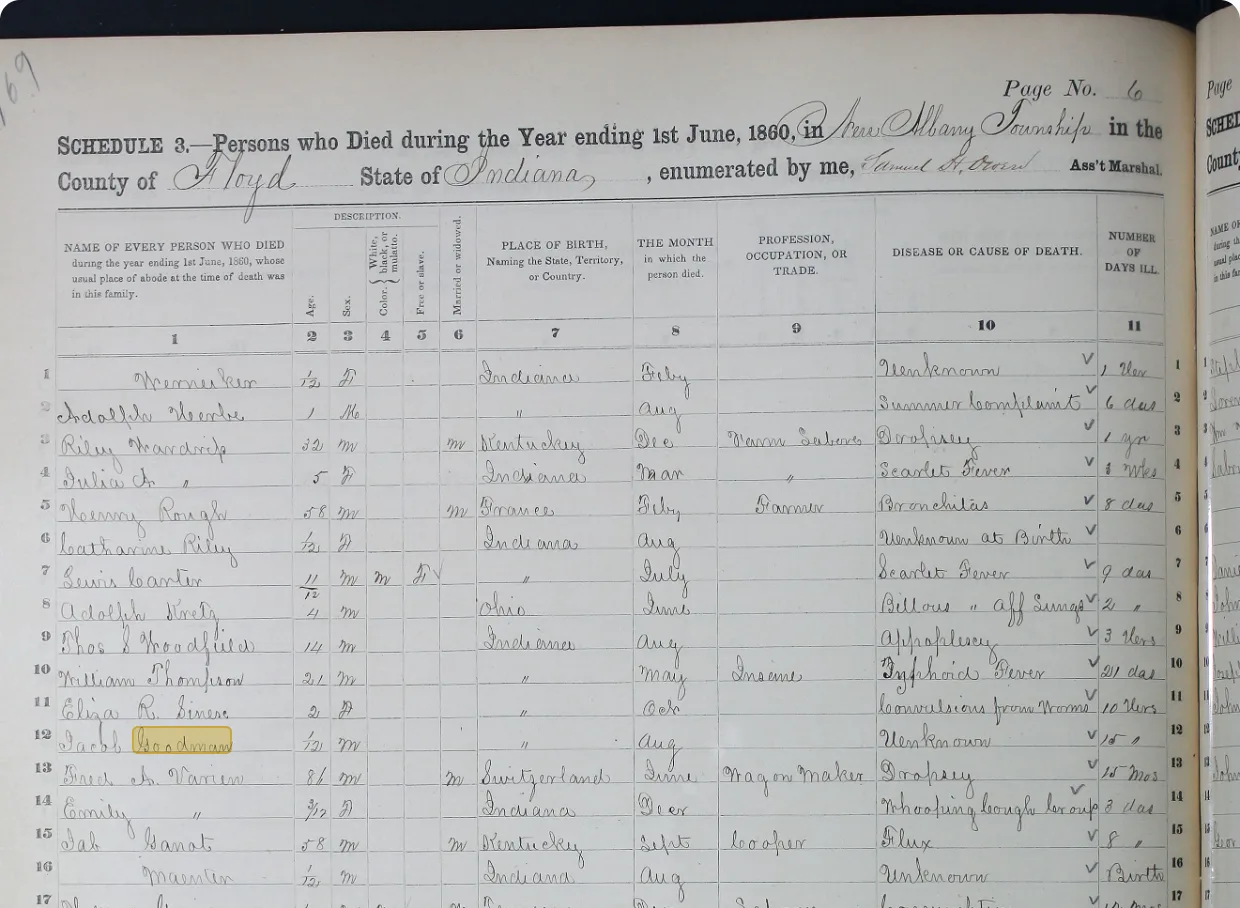
Here’s what came up:
| What we searched for | Found |
|---|---|
| Printed headings on the form | 7 of 7 |
| Surnames | 11 of 15 |
| Given names | 12 of 17 |
| Birthplaces | 6 of 7 |
| Causes of death | 10 of 16 |
| Occupations | 4 of 7 |
| Handwritten header (county, township, state) | 3 of 4 |
| Total | 53 of 73 |
A copy shrunk to 2,000 pixels wide did almost exactly as well, at 52 of 73. One page in one hand isn’t a benchmark, and a faded or hurried record will do worse. But it’s a fair picture of 19th-century handwriting.
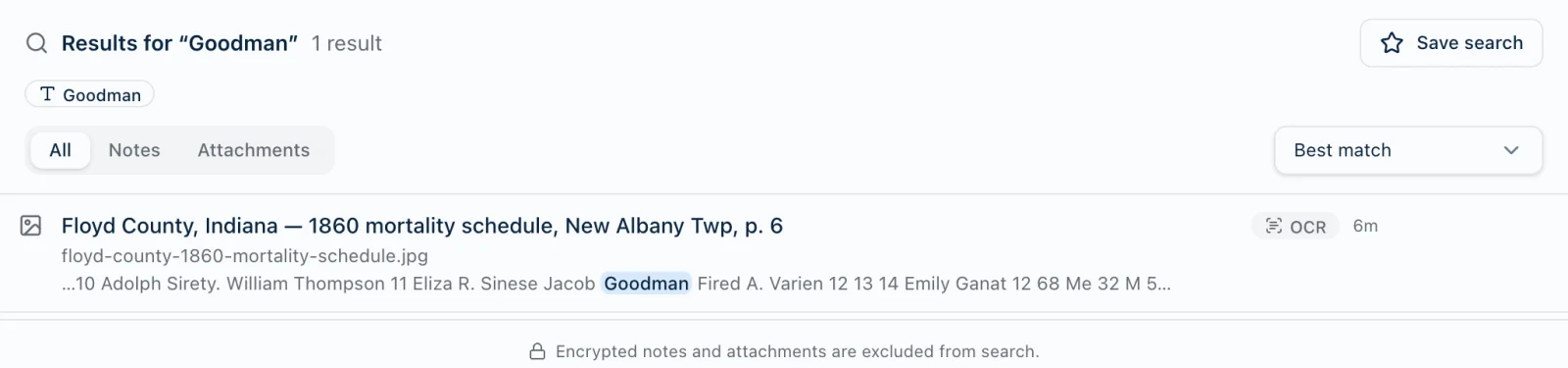
The misses had a pattern, and it’s worth knowing before you search your own records.
The looped capital C. The clerk’s C starts with a flourish that OCR reads as “le” or “b.” Catharine came out “leatharine,” Carter came out “barter,” Carpenter came out “leanhunter” and Cooper “leoofer.” Floyd lost its F and became “Moyd.”
The clerk’s spelling wins. He wrote “Bronchitas,” not “Bronchitis.” Search found his spelling and not the dictionary’s.
Four habits that get more out of any OCR search:
- Search the spelling on the page, not the one you expect.
- Search the start of a word. In Harbor,
Bronch*matches the clerk’s “Bronchitas” and the dictionary’s “Bronchitis” alike. - If a first name won’t come up, try the surname or place on the same line. Catharine Riley didn’t come up as “Catharine.” She did as “Riley.”
- Type the names that matter into the note. Typed text and the scan are searched together, and a transcription line is a habit worth keeping anyway.
A research log you’ll actually keep
Genealogy guides keep telling us to keep one, and plenty of us don’t. The New York Genealogical and Biographical Society’s list of what goes in it is the clearest we found: the ancestor’s name and years, the date of your search, the research question, the place of research, the source description, the scope of the search, the results, a document identifier, and your next steps.
Their most important line is about results: “include the results of your search, regardless of whether they were positive or negative.” The census you checked and found nothing in is the census you’ll otherwise check again in three years.
Here’s that list as a Harbor template.
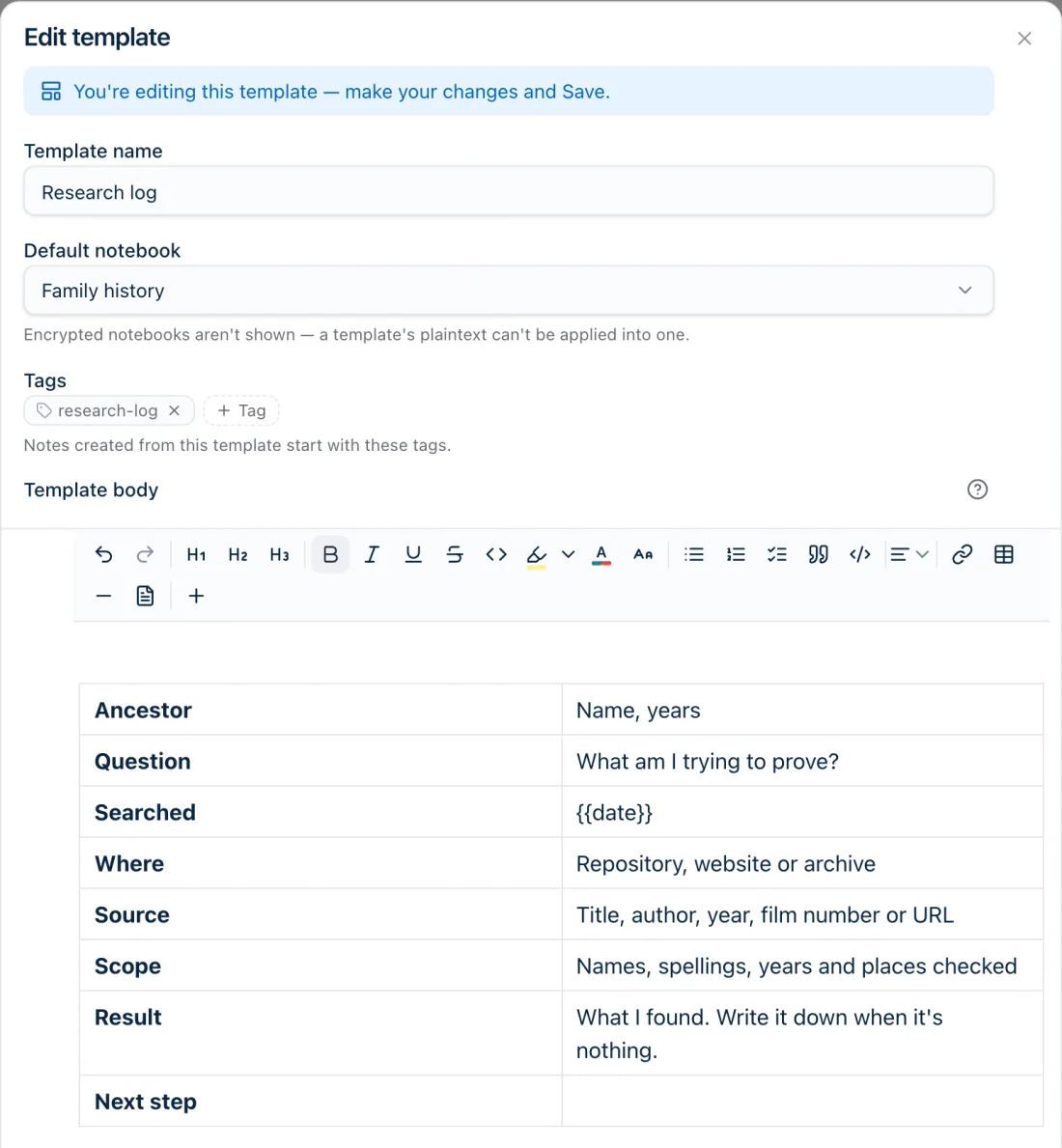
A few things make it work. The template files every new log into the Family history notebook and tags it research-log, so you never have to remember. The {{date}} turns into today’s date when you use it. Templates work in every Harbor app, so a log started at the library on your phone is waiting on your desk.
We’d keep one note per search session rather than one long log per ancestor. Tag each with the surname as well. A table of contents of every note tagged with that surname then becomes the ancestor’s running log, and it updates itself as you add sessions.
Evernote has templates too, so the same table works there if you’re staying.
Moving your genealogy notebooks out of Evernote
If you do move, the process is the same whichever app you pick. We wrote the complete guide to exporting Evernote separately. The short form for genealogists:
- Export notebook by notebook from Evernote’s desktop app. Each export is an .enex file, and doing them one at a time is what keeps your notebooks apart.
- Import each file. In Harbor, each .enex becomes a notebook. Tags, attachments, original dates and web clips with their source addresses come across, and links between your notes become links you can click.
- Rebuild stacks and nested tags. Evernote’s export format has no field for either, so no importer can recover them. Harbor’s tags nest three levels deep, so
places › indiana › floyd countytakes a few minutes of dragging. - Give OCR time. Harbor reads every image and PDF after the import, on our servers. A big library takes a while to index.
- Try one notebook first. Harbor’s free plan is enough to import a notebook or two and search it before you pay anything.
For the paper still in boxes, point a watched folder at the folder your scanner saves into. Every scan becomes a searchable note, filed in the notebook you choose.
Where Harbor fits
We make Harbor, so read this part knowing that.
Where it’s strong for genealogists. It’s $99 a year with no cap on notes, notebooks or tags, so the tagging system the old guides teach works as written. It reads text in images and in image-only PDFs, and you saw how well on a page from 1860. Its web clipper saves a full-page copy, so a record page that disappears doesn’t take your copy with it. And the price is locked for three years after you subscribe, then capped at 10% a year. That promise is in writing.
Where it loses. There’s no shared editing. A cousin can read a note you publish as a link, and you can publish a set of linked notes as a small family-history site, but they can’t edit it. Evernote, Apple Notes, OneNote and Notion all let people work in the same notes, and we don’t. Harbor’s Apple Pencil handwriting stays handwriting and isn’t converted to text. And on old cursive, OCR is a head start, not a transcription.
One genealogy-specific note on privacy. You might want to encrypt notes about living relatives or DNA matches. You can, note by note, but an encrypted note drops out of search and OCR, because we can’t read it. Encrypt those few. Leave the census pages searchable.
And if Harbor stops earning its keep, export works on every plan, even after a subscription lapses, as ENEX or Markdown.
Whatever you pick, keep doing the thing the old guides got right. Write down where you looked, even when you found nothing. The app is only where it lives.
Sources
Evernote: Compare plans (prices are in the page’s pricing data) · Free plan note limits, November 2023 · Search · Best note-taking apps for genealogists.
Genealogy and Evernote: Kerry Scott, How to Use Evernote for Genealogy (Family Tree Books, 2015), via the Genealogical Society of Victoria’s review · Family Tree Magazine, 10 ways to use Evernote for genealogy · Lisa Louise Cooke’s quick-reference guide · Family Locket, Using Evernote for genealogy research (2018) · Janine Adams, Switching from Evernote to Apple Notes (March 2024, and its comments) · Organize Your Family History (retired December 2025).
Research logs: NYG&B, Essential methods: research logs · American Ancestors research log form.
Other apps: Apple — Search notes on iPhone, Scan text and documents, Import Evernote notes, Notes on iCloud.com · Microsoft — Search notes in OneNote, Copy text from pictures and printouts, Moving from Evernote to OneNote · Notion — Importing, Files and media, Web Clipper · Obsidian — Pricing, Import from Evernote, Web Clipper, Text Extractor plugin.
The census page: U.S. Census Mortality Schedule for Indiana, 1860, Counties A–L, page 171, Indiana State Library, public domain. Searched in Harbor on October 21, 2026, against our own reading of the page.
.jpg)
Last checked: October 21, 2026. Evernote changes its plans often. If anything here is out of date, tell us at hello@harbor.my and we’ll fix it and re-date this line.