Does Harbor support templates?
Yes. Build a template once, then start a note from it whenever you need one.
Templates are made in the same editor you write notes in, so anything the editor can do, a template can hold: headings, checklists, tables (colored ones included), highlights, code blocks — whatever structure you repeat. Some that earn their keep quickly:
- Meeting notes — attendees, agenda, decisions, action items.
- Weekly review — the same questions every Friday.
- Trip packing — one checklist you never rebuild from scratch.
- Recipe or book notes — a consistent shape makes them easier to scan later.
Templates work in every Harbor app: web, Mac, iPhone and iPad, Android and Windows. They’re in the Harbor CLI too, as harbor templates list, get, create, update, delete and apply. A template you build on one device shows up on all the others.
If you’re coming from Evernote, this replaces its templates feature — except you build your own directly in the editor rather than browsing a gallery.
What a template can carry
A template is more than a body of text. When you build one, you can also give it:
- A default notebook. Notes made from the template land there. You can still pick a different notebook at the moment you use it, so the default is a starting point, not a rule.
- Tags. They’re filled in for you when you use the template, and you can add or remove any of them before you create the note. Whatever’s in the tag row when you press Create note is what the note gets.
- Variables. Type
{{date}}and Harbor writes in today’s date when you use the template. There are 13 of them — see What variables can I use in a template?
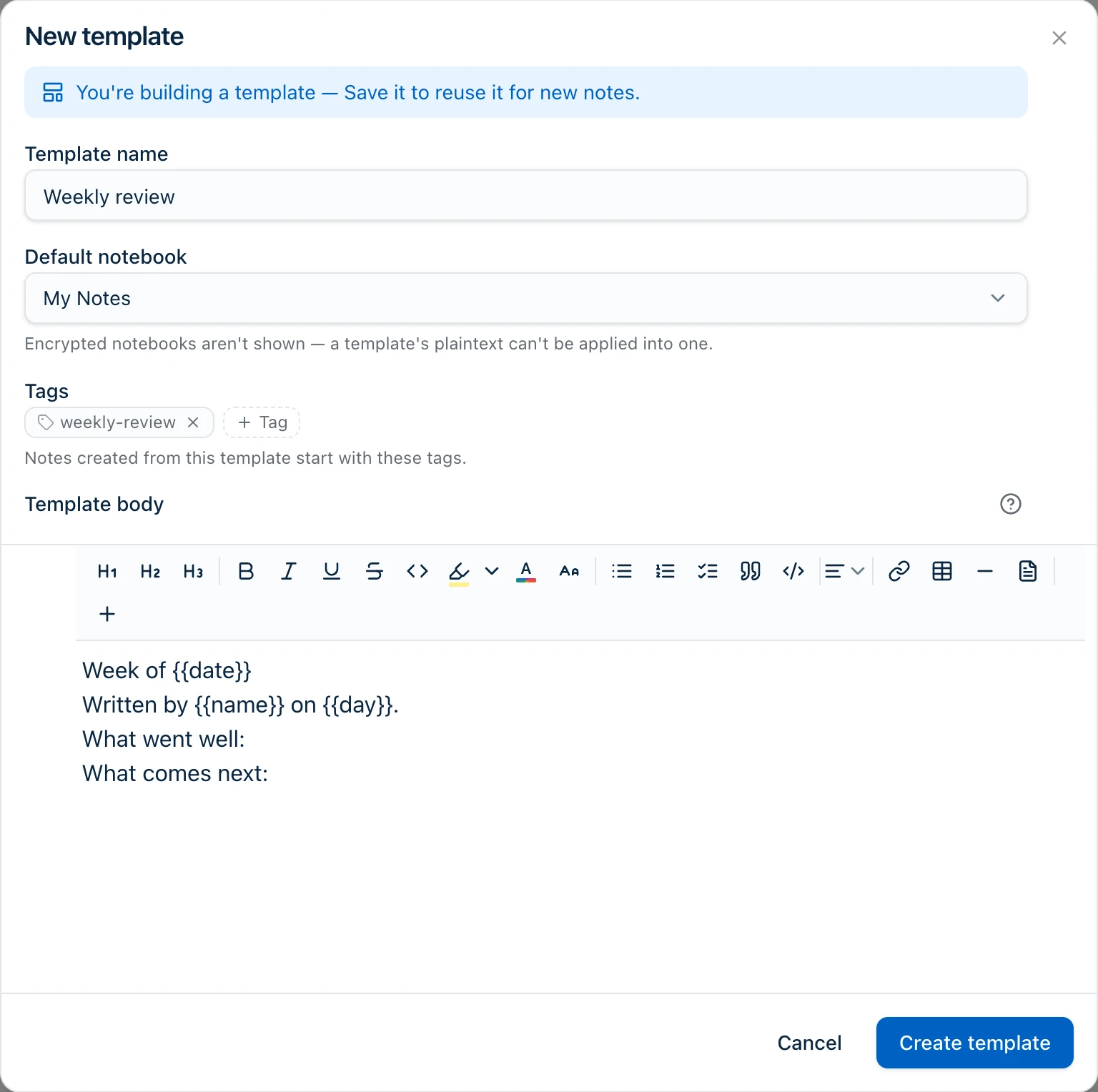
Why encrypted notebooks aren’t in the list
A template’s body is stored as plain text. An encrypted notebook only holds encrypted notes, so a template can’t drop a plain-text note into one. That’s why encrypted notebooks don’t appear in the Default notebook picker — the same rule the Use template window already follows.
If a template’s notebook is later deleted or turned into an encrypted one, the template still works. The note goes to your default notebook instead, and Harbor says so in a one-line message at the top of the new note. That’s an explanation, not an error.
Using a template inside a note you’re already writing
You don’t have to start a new note. Use a template in a note you already have and its body is added to that note, with any variables filled in.
Its tags are added to that note, on top of whatever tags it already has. Nothing you’d already tagged gets replaced. The notebook doesn’t change, because the note is already filed somewhere and moving it would be a surprise.
One neighboring feature
If what you actually repeat is a to-do rather than a document, Harbor’s tasks support real recurrence — a task can come back every week on its own, no template needed.
Related questions
Need more help?
Still stuck? Send us a message and a real person will get back to you.