Switching from Evernote
Move your whole Evernote across.
Import your notebooks, tags, checklists, attachments, and web clips — nothing left behind. Then own your notes for good.
Free plan to start · No credit card

How it works
Three steps. One afternoon. Done.
Export from Evernote
In Evernote, export your notebooks as ENEX files — the standard format Evernote has used for years. Everything you have comes along.
Import into Harbor
Drop the files into Harbor's importer. A live progress bar shows exactly what's coming across — X of Y, no mystery.
Everything's there
Notebooks, tags, checklists, attachments, clips, and your original dates all arrive. Start working immediately.
The importer is built in — and the free plan is enough to test with a notebook or two.
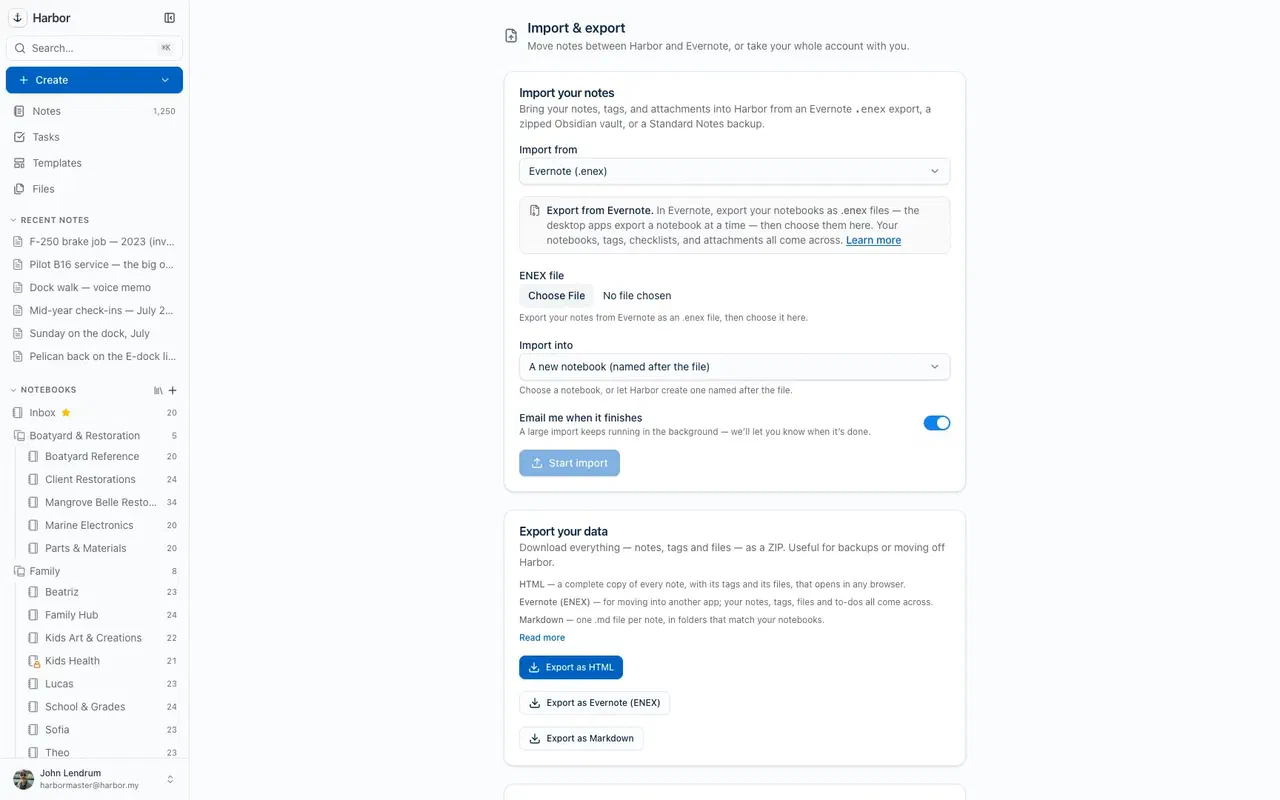
What comes across
One-step ENEX import with live progress, original dates preserved. What carries over, and what doesn't →
On the other side
Everything you moved for. Nothing you left.
Real OCR search
Find words inside your scans, photos, and PDFs — highlighted on the page.
Optional encryption
Zero-knowledge locks for the notes that need them. Only you hold the key.
Native speed
Real apps on every platform — fast, light, and fully offline.
A price that holds
No increase for 3 years, then capped at 10%/yr. In writing.
Worth the move
| Harbor | Evernote | |
|---|---|---|
| Price | $9.99/mo or $99/yr — locked in writing for 3 years, then capped | Roughly doubled under new ownership |
| Free plan | Enough to genuinely try it — and your data never held hostage | Gutted to 50 notes |
| If you stop paying | Read-only account; export and delete anytime | Locked behind limits |
| Encryption | Optional zero-knowledge encryption per note or notebook | Notes stored readable on their servers |
| Apps | Genuinely native on Mac, Windows, iOS & Android | One slow Electron app everywhere |
| Offline | Full offline everywhere — even search, even in the browser | Offline notes on every plan |
| Search inside files | OCR in photos, scans & PDFs; the words in Office files; searchable audio transcripts | Image and document search on every plan |
| AI | Bring your own — open API, CLI & MCP for your ChatGPT or Claude | A weaker built-in AI, used to justify price hikes |
| API | Open REST API + OpenAPI, first-class | Public API abandoned |
| Leaving | One-click full export (HTML, Markdown or Evernote ENEX) | Harder than it should be |
Swipe the table to see the Evernote column →
Still comparing? The full case for Harbor as your Evernote alternative →
Common questions about switching
What is an ENEX file?
Can I test the import on the free plan?
Will my formatting survive?
Do my tags and notebooks come over?
Can I go back, or export again later?
Will my notes work in Obsidian?
.md per note, attachments alongside, and [[wikilinks]] between them. Harbor imports an Obsidian vault back, too, so the door swings both ways. How to export as Markdown →Is there a size limit on imports?
What about my Evernote AI features?
Not decided yet?
Read the honest comparison of Evernote alternatives — Harbor is one of eleven on it, disclosed as ours, and it doesn't win every row. If the price is what pushed you, we traced every Evernote price change back to 2016.
Your Evernote, but yours
Bring your second brain home.
Start free, import in one sitting, and never worry about the rug again.
Free plan to start · No credit card