Can I publish a set of linked notes?
Yes. Publish several notes that link to each other and readers can click straight through the whole set — so a handful of Harbor notes becomes a small public site: a handbook, a wiki, a set of docs, a knowledge base.
You already know the first half of this: any note can be published as a read-only public link. The new part is what happens to the links inside it.
Links between public notes work
If a published note links to another note you’ve also published, that link is live on the public page. It shows the target’s real title and clicking it opens that note’s public page.
Do that with an index note as the front page and you have a navigable set — one URL to hand out, and readers find their own way around.
Or use a table of contents as the front page instead. It lists every note with the tags you pick, so a note you tag and publish later joins the front page by itself. Readers only ever see the notes you’ve made public. The rest are left out without a trace.
Links to private notes go nowhere — and give nothing away
A link to a note you haven’t published stays on the page and stays clickable, but it doesn’t lead anywhere. It lands on a Note not found page:
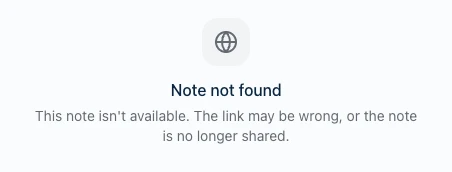
Here’s the reassuring part, and it’s worth saying plainly: the private note’s title is never shown. The link renders as the single word Note. Not a greyed-out title, not a tooltip, not something hidden in the page source a curious reader could dig out — the title never leaves our servers at all.
It goes further than that. A private note, a note you deleted, and a note that never existed all produce the exact same link. A reader can’t tell which they hit, so they can’t learn anything about what you’re keeping back — not even that there is something.
Harbor warns you before you publish
You don’t have to notice this yourself. When you make a note public, Harbor checks its links first. If they all already point at public notes — or if it doesn’t link to anything, which is most notes — it just publishes, with no fuss.
If any target is still private, it stops and tells you:
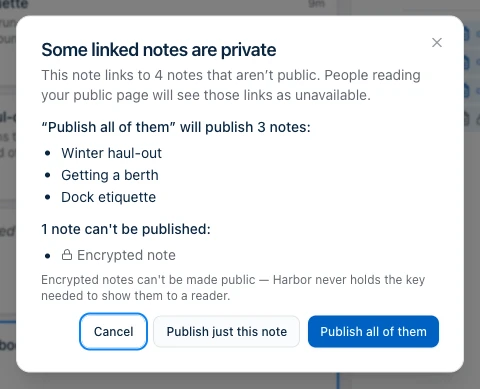
It lists them by title, so you can see exactly what’s involved, and offers three ways out:
- Publish all of them — publishes every note in that list, then this one. The list is exactly what it will publish, nothing more. Harbor does the linked notes first, so by the time your page exists its links already work.
- Publish just this note — the page goes out with those links unavailable. Sometimes that’s what you want.
- Cancel — publishes nothing at all. Not the linked notes, and not this note either.
Encrypted notes can’t be published
Encrypted notes can’t be made public, so they’re never in the “publish all of them” list. Harbor shows them separately with the reason rather than quietly leaving them out — a note vanishing from a list it belongs in is how you end up believing a page is finished when it isn’t.
The reason is one sentence: Harbor can’t read an encrypted note, so it can’t show one to a reader. The key never leaves your devices, and a public page has no key.
If a note needs to be part of a public set, decrypt that one note first.
Putting it together
The whole thing, end to end:
- Write your notes and link them to each other however makes sense.
- Select them in the note list — sort it first if you want a particular order.
- Build an index note. That’s your front page.
- Make the contents page public. Harbor spots the private links and offers to publish the rest.
- Accept the offer, and share the one link.
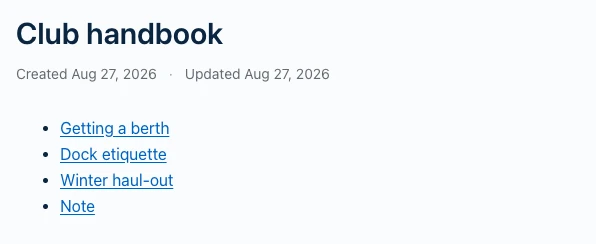
That’s the finished front page. Three entries carry their real titles and open the note behind them; the fourth reads Note because that one is encrypted and stayed private — which is exactly what a reader should see.
Anyone who opens it gets a clean, read-only site with working navigation, no account required.
What this isn’t
It’s a published set of notes, not a website builder. There’s no custom domain, no theme, no navigation bar, no search across the set — the structure is whatever links you wrote. It’s also still read-only, with no collaboration: nobody can edit or comment.
Turning a note private again takes its page down immediately, and any link pointing at it drops back to unavailable on the pages that remain.
Related questions
Need more help?
Still stuck? Send us a message and a real person will get back to you.