Leaving Evernote?
The Evernote alternative that puts its price in writing.
Import your whole Evernote in one step — notebooks, tags, and attachments intact — into an app that can't quietly double its price on you. Built by Cloudmanic Labs, a software company that's been shipping for 20+ years.
Free plan to start · No credit card
Why people are leaving
What Evernote costs now
50 notes
The free plan's ceiling
Evernote's free tier now stops at 50 notes, one notebook, and one device — down from unlimited notes for over a decade.
$99/yr
Starter — capped at 1,000 notes
The entry paid plan introduced in November 2025 is the first Evernote plan ever to put a hard cap on a paying customer's notes.
$249.99/yr
Advanced — the plan without caps
Unlimited notes now costs $249.99 a year. Long-time users describe being moved up from plans that cost roughly $70 a few years ago.
Plans and prices verified on evernote.com — September 14, 2026. · Read what long-time users are saying
Side by side
Harbor vs. Evernote
| Harbor | Evernote | |
|---|---|---|
| Price | $9.99/mo or $99/yr — locked in writing for 3 years, then capped | Roughly doubled under new ownership |
| Free plan | Enough to genuinely try it — and your data never held hostage | Gutted to 50 notes |
| If you stop paying | Read-only account; export and delete anytime | Locked behind limits |
| Encryption | Optional zero-knowledge encryption per note or notebook | Notes stored readable on their servers |
| Apps | Genuinely native on Mac, Windows, iOS & Android | One slow Electron app everywhere |
| Offline | Full offline everywhere — even search, even in the browser | Offline notes on every plan |
| Search inside files | OCR in photos, scans & PDFs; searchable audio transcripts | Image and document search on every plan |
| AI | Bring your own — open API, CLI & MCP for your ChatGPT or Claude | A weaker built-in AI, used to justify price hikes |
| API | Open REST API + OpenAPI, first-class | Public API abandoned |
| Leaving | One-click full export (HTML, Markdown or Evernote ENEX) | Harder than it should be |
Swipe the table to see the Evernote column →
A real replacement
Everything you moved to Evernote for. Working.
An alternative only counts if nothing you rely on goes missing. Harbor was built feature-for-feature for Evernote refugees — then improved where Evernote stopped trying.
Real OCR search
Find words inside photos, scans, PDFs, and handwriting — highlighted on the page, included on the free plan, not gated behind a tier.
Native apps everywhere
Real Mac, Windows, iPhone, iPad, and Android apps — plus the web, a clipper, and a CLI. Fast, light, fully offline.
Bring your own AI
An open API, CLI, and MCP server — connect the ChatGPT or Claude you already have. Evernote's MCP connector is in beta and not on its free plan. Harbor's is part of the one plan.
A clipper that works
Chrome, Edge, Firefox, and Safari. Clips arrive readable, searchable, and where you filed them.
Optional encryption
Zero-knowledge locks for the notes that need them — per note or notebook, your choice. Only you hold the key.
Never held hostage
Stop paying and your notes stay — readable, exportable, free. Leaving Harbor is easy on purpose. That's the point.
Your whole Evernote, moved in an afternoon
Export your notebooks from Evernote as ENEX files and drop them into Harbor's importer. Notebooks, tags, checklists, attachments, web clips, and your original dates all arrive — with a live progress bar the whole way.
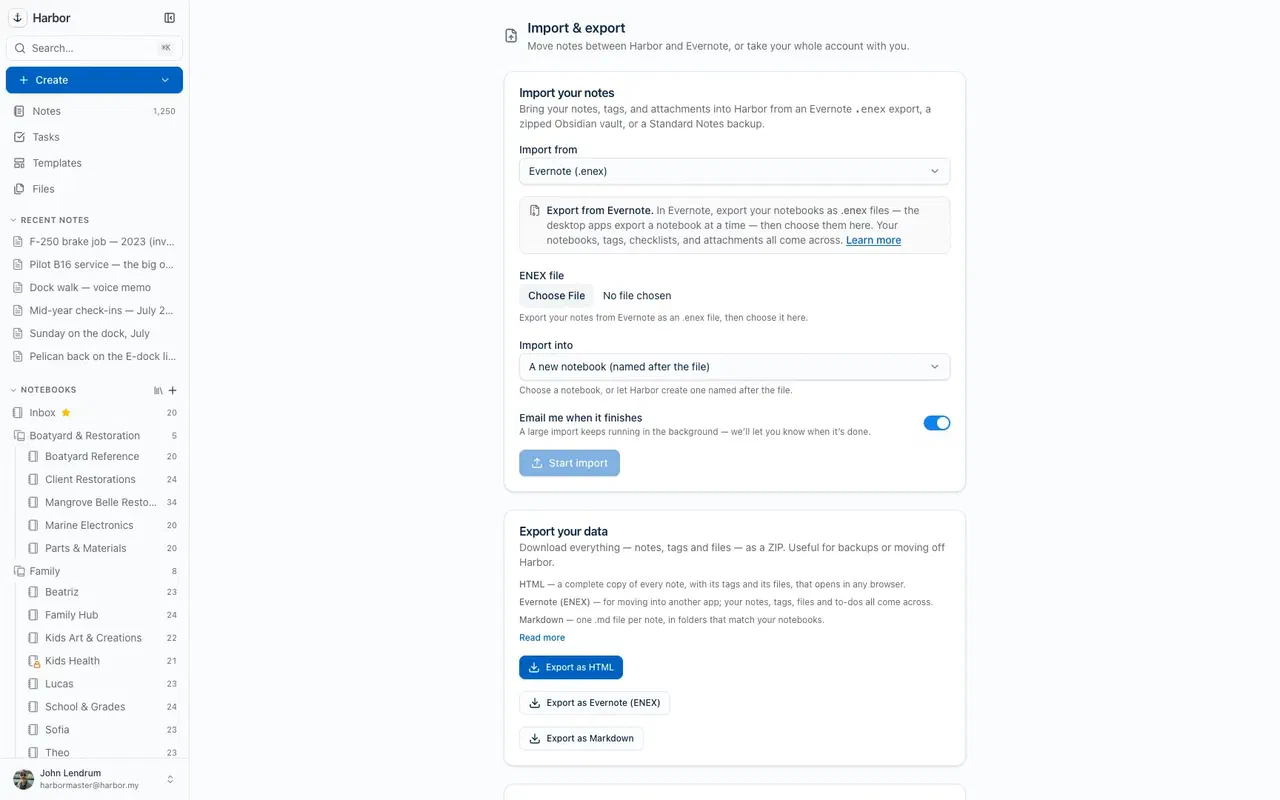
The free plan is enough to test with a notebook or two — no credit card.
The part no other notes app offers
A price promise, in writing.
No increase for your first three years. After that, never more than 10% a year. It's published on our pricing page and in our terms — not a blog post that evaporates after an acquisition, but a commitment you can hold us to. We made it because this category has burned people before.
A fair look
Where Evernote still has the edge
No switching page you can trust is one-sided. Here's what Evernote does today that Harbor doesn't.
AI built into the app
Evernote ships an AI assistant, AI search, and AI editing inside the product. Harbor deliberately builds none in — you connect the ChatGPT or Claude you already have instead. If you want AI baked in rather than brought along, that's a real difference.
Calendar integration
Evernote connects to Google Calendar and ties notes to events. Harbor has tasks and reminders, but no calendar integration today.
Years of third-party integrations
A decade of Zapier hooks and plug-ins grew up around Evernote. Harbor gives you an open API, CLI, and MCP server — a stronger foundation, but a younger ecosystem with fewer plug-and-play connectors so far.
The product's age
Evernote has existed since 2008; Harbor shipped in 2026. Our company has been building software for 20+ years, but the product is the younger one — we won't pretend otherwise.
If those outweigh a capped price, easy exports, and native apps, Evernote may still be your app. We'd rather you choose well than choose us.
Questions people ask before switching
What is the best alternative to Evernote?
Is there a free Evernote alternative?
How do I move my notes out of Evernote?
Will my notebooks, tags, and attachments survive the move?
Does Harbor have OCR like Evernote?
Can I connect ChatGPT or Claude to my notes?
Can I export my notes to Markdown or Obsidian?
.md per note, attachments alongside — which is an Obsidian vault as it stands. Harbor imports an Obsidian vault back too, so you are never choosing a one-way door. How to export as Markdown →What if Harbor raises prices the way Evernote did?
Read next
The safe harbor
Leave the rug-pulls behind.
Start free, import your whole Evernote in one sitting, and keep the right to walk away with everything — forever.
Free plan to start · No credit card