How do I import from Readwise Reader?
Paste your Readwise token into Harbor, and every document you saved in Reader comes in as a note. Not a link to the article, but the article itself, with its pictures. PDFs and EPUBs come in as the original files.
It’s on the web, and the notes then sync to every Harbor app like any other note.
1. Copy your token
Signed in to Readwise, open readwise.io/access_token and copy your token. Reader uses your Readwise token. There isn’t a separate one.
2. Paste it into Harbor
Open app.harbor.my and go to Import & export in the sidebar. Set Import from to Readwise Reader (token), paste your token into Readwise access token, and press Import. Don’t see Readwise Reader (token)? Reload the page.
Everything goes into a notebook named Readwise Reader unless you pick one of yours under Import into. Encrypted notebooks aren’t in that list, because our servers can’t write into them.
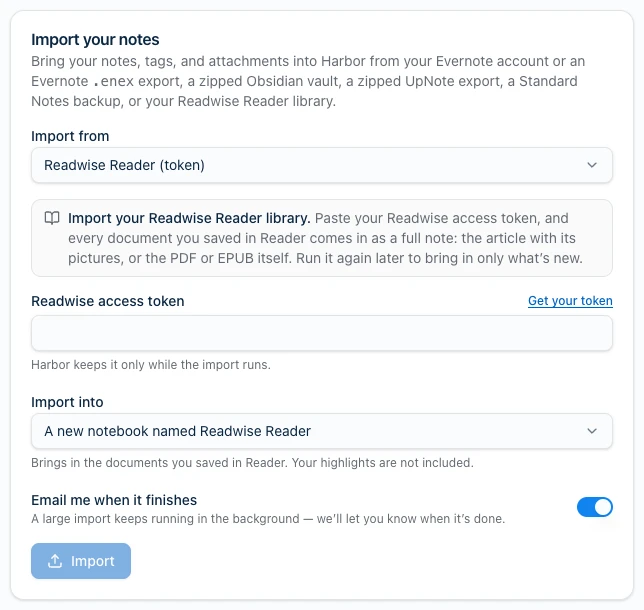
Once it starts, the import runs on our servers, so you can close the tab. Leave Email me when it finishes on and we’ll write when it’s done. A big library takes a while, mostly to download the pictures and files.
Harbor keeps your token only while the import runs. Then it’s deleted.
There’s no Readwise import in the Mac, Windows, iPhone, iPad or Android apps, and you don’t need one: the notes show up there as soon as they’re in.
What comes in
Every document you saved, wherever it sits in Reader: Inbox, Later, Shortlist or Archive.
| In Reader | In Harbor |
|---|---|
| An article, or an email or RSS item you saved | A note with the whole article and its pictures. It opens like an article you clipped with the Web Clipper |
| A PDF or EPUB | A note with the original file in it. PDFs get OCR’d, so search finds the words inside |
| A document with no article or file | A note with its details and the link |
| The title | The note’s title |
| The link to the original | The note’s source link |
| The author | The note’s author |
| The date you saved it | The note’s created date |
| Tags | Tags |
| The summary, and the note you wrote on it | At the top of the note, before the article |
The top of each note looks like a web clip’s: the site it’s from, who wrote it and when it was published, then Reader’s summary. Your own note follows, under a bold Note: line.
Pictures are downloaded into Harbor, so they’re still there if the site takes them down. If one can’t be downloaded, the note keeps pointing at it on the web.
A PDF or EPUB over Harbor’s 500 MB limit comes in as a link, too. When the import finishes, the summary says how many notes came in as a link only:
2 came in as a link only, with no article or file.
What doesn’t come in
- Feed items you never saved. Only what you saved comes in.
- Highlights, and the notes you made on them. They stay in Readwise.
- Where it sat in Reader. Inbox, Later, Shortlist and Archive all come in, but Harbor doesn’t keep which was which, or how far you’d read.
Running it again
Run it again whenever you like. Harbor brings in only what it doesn’t already have: documents you’ve saved since, and anything an earlier import missed. Everything else is skipped, and the summary says how many.
A note you delete in Harbor stays deleted. And changing a document in Reader afterwards doesn’t change its note. It’s a copy, not a sync.
If something goes wrong
These show on the card, and nothing starts:
| Harbor says | What to do |
|---|---|
| That token didn’t work. Copy it again from readwise.io/access_token. | Copy the token again and paste it in. |
| Readwise isn’t answering right now. Please try again in a few minutes. | Try again in a few minutes. |
| A Readwise Reader import is already running for this account. | Wait for that one to finish. |
If an import stops part way, or leaves a document out, its details page says why. Open Import & export and press Details next to the import under Past imports. You’ll see one of these:
- “Readwise stopped accepting your token part way, so the import stopped. Import again with a new token from readwise.io/access_token to bring in the rest.”
- “Readwise wasn’t answering, so the import stopped. Import again later to bring in the rest.”
- “Readwise wouldn’t hand over this document’s file, so it was left out. Importing again tries it again.”
Whatever came in stays. The next import skips it and brings in the rest.
Coming from somewhere else too? There’s Evernote, Obsidian, Standard Notes and UpNote.
Need more help?
Still stuck? Send us a message and a real person will get back to you.