What variables can I use in a template?
Thirteen. Type one into a template, like {{date}}, and Harbor swaps it for the real value the moment you use the template.
So a template that starts with Week of {{date}} becomes a note that starts with Week of Aug 10, 2026. The template itself never changes — it keeps its placeholders for next time.
How to add one
Type it anywhere in the template’s body or its name. Capital letters and spaces inside the braces don’t matter: {{date}}, {{Date}} and {{ date }} all work.
Or let Harbor type it for you. In the template builder, click the ? next to Template body and pick one from the list. Each one shows what it would turn into right now.
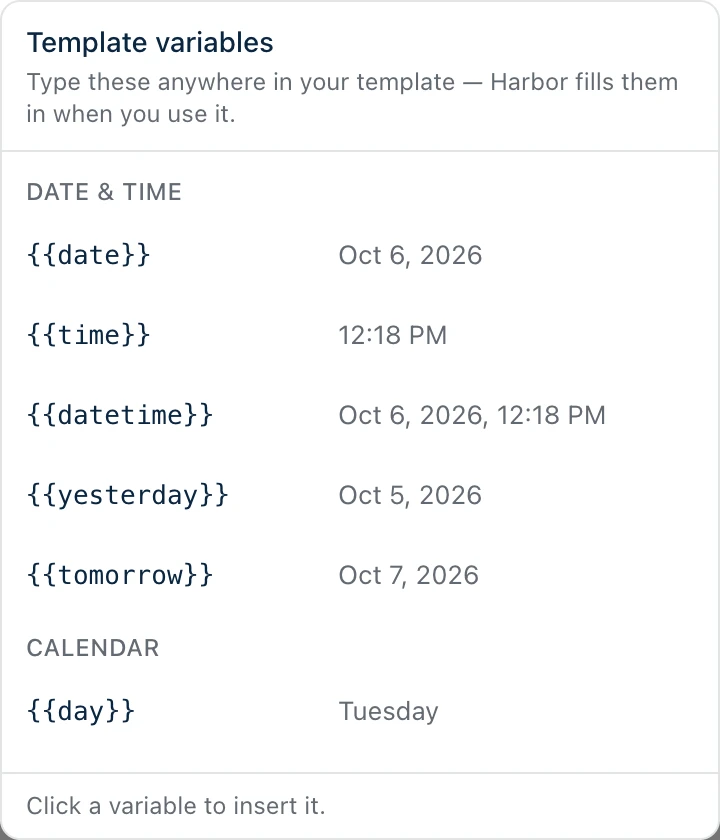
The full list
The examples below are for Monday, August 10, 2026 at 9:29 in the morning, in a note called “Weekly review” in a notebook called “Inbox”, for someone named Dev Account.
Date & time
| Variable | What you get | Example |
|---|---|---|
{{date}} | Today’s date | Aug 10, 2026 |
{{time}} | The time right now | 9:29 AM |
{{datetime}} | Today’s date and the time | Aug 10, 2026, 9:29 AM |
{{yesterday}} | Yesterday’s date | Aug 9, 2026 |
{{tomorrow}} | Tomorrow’s date | Aug 11, 2026 |
Calendar
| Variable | What you get | Example |
|---|---|---|
{{day}} | The day of the week | Monday |
{{day_short}} | The day, shortened | Mon |
{{month}} | The month | August |
{{month_short}} | The month, shortened | Aug |
{{year}} | The year | 2026 |
This note
| Variable | What you get | Example |
|---|---|---|
{{title}} | The new note’s title | Weekly review |
{{notebook}} | The notebook the note is going into | Inbox |
{{name}} | Your name, from your profile | Dev Account |
{{title}} only works in the body — a title can’t contain itself, so in the name it stays as typed. If your profile has no name, {{name}} comes out blank.
Dates follow your settings
The date and time variables use the format you picked in Settings → Preferences → Date & time format, and your time zone. So the same template reads differently for different people, which is the point: everyone gets dates the way they’d write them.
If you’ve picked the year-first format and a 24-hour clock, {{datetime}} gives you 2026-08-10 09:29. With the long date format and a 12-hour clock, it’s August 10, 2026, 9:29 AM.
Day and month names are always in English, whatever language your device is set to.
Using Harbor on a Mac, iPhone, Android or Windows? {{datetime}} used to come out as August 10, 2026 at 9:29 AM on those apps, no matter what your settings said. It now follows your settings and matches the web app and the editor’s “Current date & time” insert. Nothing broke — it’s just consistent now.
Anything else is left alone
If Harbor doesn’t recognize something in double braces, it leaves it exactly as you typed it. {{whatever}} stays {{whatever}}.
The flip side: there’s no way to write a literal {{date}} into a template and have it survive. Harbor will always fill it in.
For the rest of what a template can do — a default notebook, tags, using one inside a note you’ve already started — see Does Harbor support templates?
Related questions
Need more help?
Still stuck? Send us a message and a real person will get back to you.