What search operators does Harbor support?
Harbor speaks an Evernote-style search grammar. If you learned Evernote’s search, you already know most of Harbor’s. It works the same on web, Mac, Windows, iPhone, iPad and Android — even offline, because each app runs it against its own copy of your notes.
Words and phrases
- Plain words —
boiler manualfinds notes that have both words. Harbor matches whole words and their forms, soplanfinds “plans” and “planning”. - Start of a word — add
*to match every word that starts that way.tom*finds “tomato”. Plaintomdoesn’t, except in a file name. - “Quoted phrases” —
"grand total"matches those words, together, in that order. The curly quotes a phone keyboard types work the same as straight ones. - Tag names — a tag’s name typed as a plain word finds notes with that tag, too.
articlefinds notes tagged article, as well as notes that say “article”. - Website addresses —
portlandcolocation.comfinds notes you clipped from that site. - File names — a word or phrase also matches the names of attached files, extension included.
xlsxfinds your Excel files. How that works.
Operators
| Operator | Example | What it finds |
|---|---|---|
tag: | tag:taxes | Notes with that tag. Use quotes for a name with spaces: tag:"home repair". |
notebook: | notebook:Receipts | Notes in that notebook. Capitals don’t matter. |
intitle: | intitle:budget | Notes with the word in their title. |
resource: | resource:pdf | Notes with that kind of file attached. |
created: | created:20260115 | Notes made on that day. |
updated: | updated:day-7 | Notes changed in that stretch of time. |
tag: matches that one tag. A child tag underneath it doesn’t count. Use more than one and a note needs all of them: tag:taxes tag:2025.
notebook: works the other way. notebook:Receipts notebook:Bills finds notes in either one.
intitle: only looks at titles, so it never brings up a file — only notes.
If a tag or notebook doesn’t exist, the search finds nothing. That’s on purpose: a typo shouldn’t quietly show you every note you have.
File types
resource: takes one of five values:
resource:image— photos, scans and other picturesresource:pdf— PDFsresource:audio— recordings and other sound filesresource:application— documents like PDFs, Word files and spreadsheetsresource:any— any file at all
resource:application lumps Word files, spreadsheets and PDFs together. To pick out your Excel files, search xlsx instead, which matches the file name.
File names
Search reads the names of your attached files, extension included. xlsx finds your Excel files, and budget finds Q3 Budget.xlsx. That’s on top of the words inside the file.
Any part of the name counts, so budg finds Q3 Budget.xlsx too. No * needed. It goes by letters, not words: plan finds Airplane.jpg, and plans won’t find Floor plan.pdf.
Every word you type has to be in the name. budget xlsx finds Q3 Budget.xlsx; budget pdf doesn’t. Quotes keep words together, space and all: "Q3 Budget".
Put - in front of a word to leave a file out by its name: budget -xlsx skips Q3 Budget.xlsx.
Capitals from A to Z don’t matter, so XLSX works. Letters outside A to Z have to match exactly, accents and capitals included: ubersicht won’t find Übersicht.pdf, and ärzte won’t find Ärzte Liste.pdf.
A file found by its name is listed below your notes, ahead of files that matched on the words inside them. It has no excerpt and no In file label, because nothing inside it matched. Open it and you’re in the note it’s attached to. If the words inside the file match as well, you see it once, with its excerpt, like any other match inside a file.
A file has to be in a note outside the trash to be found by name. Files in encrypted notes are never searched, names included.
Dates
created: and updated: take a date written YYYYMMDD, year first:
created:20260115— made on January 15, 2026created:20260101..20260131— made any day in January 2026, both ends includedupdated:day-7— changed today or in the six days before itupdated:day-1— changed today
Days are counted in UTC, so a note written late in the evening can land on a different day.
Leaving things out
Put - in front of a word, a phrase, or a tag:, notebook: or intitle: operator to leave those notes out:
-draft— every note that doesn’t mention “draft”-"first draft"— leaves out that exact phrase-tag:draft— every note that isn’t tagged draft-notebook:Archive— everything outside the Archive notebook-intitle:template— skips notes with “template” in the title
- doesn’t work on resource:, created: or updated:.
Putting it together
Operators combine however you like:
notebook:Receipts tag:2025 -returned "store credit"
…finds 2025 receipts that mention “store credit,” skipping anything that says returned.
If Harbor can’t read a search — resource:video, or a date like created:2026-01-15 — you get an error instead of a guess.
A few more things worth knowing:
- Search reaches inside attachments. Words in PDFs, photos and scans count as matches, thanks to OCR. So do the words in Word, Excel, PowerPoint and text files.
- Search reads file names, extension included. How it works.
- Search knows where a clip came from. Search a site’s bare address — just
portlandcolocation.com— and the notes you clipped from that site come to the top: below a title match, ahead of notes that only mention the site in passing. Longer forms likewww.portlandcolocation.comor the full address still find those notes, they just don’t lift them to the top;https://in front of a bare address can come up empty. - Saved searches keep a query you use often one click away — and you can pin one to the sidebar as a shortcut.
- Quick search (⌘K, or Ctrl+K on Windows) gets you to search without touching the mouse — and jumps straight to a notebook, stack or tag.
Search never sees encrypted notes or the files inside them, not even the files’ names. That’s by design.
Jump to a notebook, stack or tag
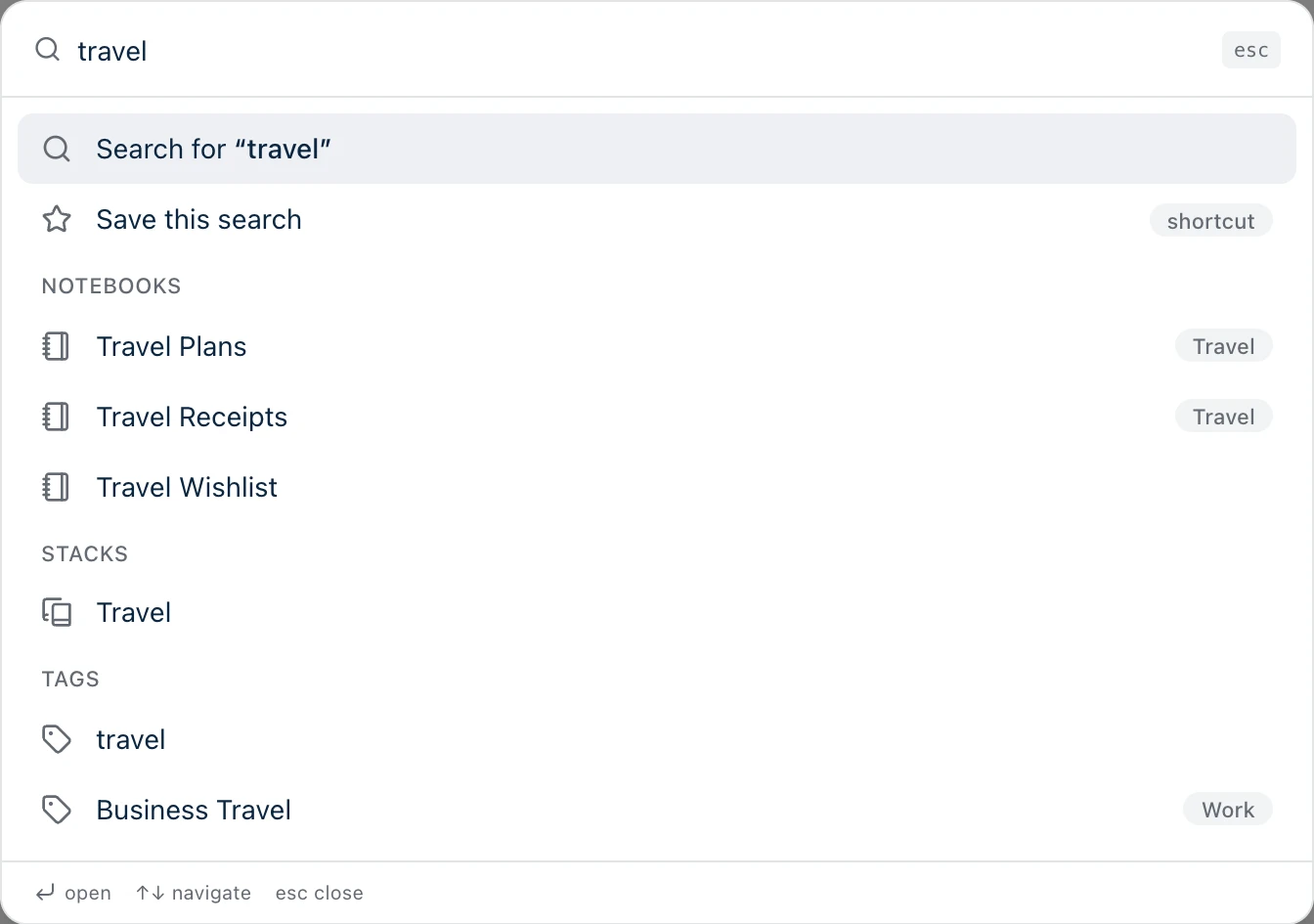
Quick search isn’t only for notes. Type part of a notebook, stack or tag name and it shows up under Notebooks, Stacks or Tags, above the note results. Press Enter, or click it, and you’re there — same as clicking it in the sidebar.
It works everywhere Harbor runs:
- Web and Mac — press ⌘K (Ctrl+K in a browser on Windows).
- Windows — press Ctrl+K.
- iPhone and iPad — tap the search button.
- Android — tap the search button, or press Ctrl+K with a keyboard.
A few details:
- It matches names only. Each list shows up to three, best match first.
- A notebook in a stack shows the stack’s name beside it. A nested tag shows its parent, like
Work. - Picking a stack opens every note in every notebook in it.
- In a workspace, you only see the notebooks, stacks and tags that workspace shows in its sidebar.
- Search operators like
tag:don’t apply to these lists. They match the plain name you type.
Need more help?
Still stuck? Send us a message and a real person will get back to you.