Can I paste Markdown into a note?
Yes. Paste Markdown — the plain-text formatting AI assistants and code sites use — and Harbor spots it and asks how you want it pasted.
You’ll see a box titled It looks like you’re pasting Markdown, with three choices:
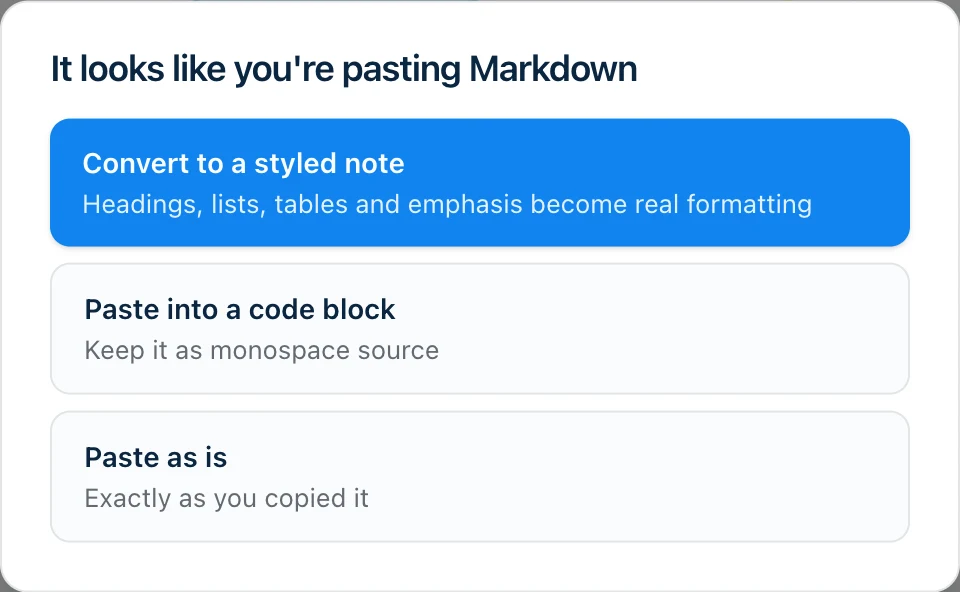
- Convert to a styled note — headings, lists, tables and emphasis become real formatting.
- Paste into a code block — keeps it as monospace source.
- Paste as is — exactly as you copied it.
Harbor asks instead of guessing because there’s no way to be right every time. A ChatGPT answer usually wants converting; a chunk of shell script full of # comments almost never does.
What comes across when you convert
Headings, bold and italic, bulleted and numbered lists, checkboxes, quotes, code blocks, links, tables, and horizontal rules all arrive as real formatting — the same formatting you’d get by typing it, and editable the same way.
Two honest limits:
- A Markdown image comes in as a link to the picture rather than the picture itself. Harbor doesn’t go out and download images from other people’s sites.
- Text that’s a single code block stays one. If what you copied is one code block from top to bottom — the way a chat window sometimes hands over a whole answer — converting keeps it as a code block, unless its opening line labels it
markdownormd. Harbor won’t guess whether what’s inside is a document or a shell script, because guessing wrong would rewrite your script. The other two choices still do exactly what they say.
Things worth knowing
- You can’t lose the paste. Press Esc or click outside the box and it pastes as is.
- One undo puts it back. Undo reverses the whole paste in one step, whichever choice you made. Press ⌘Z (Ctrl+Z on Windows), or use the Undo button.
- ⌘⇧V skips the box. The usual paste-and-match-style shortcut — Ctrl+Shift+V on Windows — pastes without asking.
- No keyboard, no shortcut — use the box. There’s no ⌘⇧V on a touch keyboard, so on a phone or tablet the box itself is how you steer a paste: tap Paste into a code block to keep the raw Markdown characters, or Paste as is to leave it alone.
- Ordinary writing is never interrupted. The box only appears when the text really is structured like Markdown: a heading, a list, a table, a quote, a code fence. A stray asterisk or dash in a normal paragraph doesn’t count.
- Pasting inside a code block never asks. That’s where you’d deliberately be keeping raw Markdown.
Markdown paste is in every Harbor app: web, Mac, iPhone, iPad, Android and Windows. Notes you create this way are ordinary notes, so they sync everywhere like anything else you write.
It’s most useful right where you’d expect: an answer from ChatGPT or Claude, a README, or notes exported from another app. If you’d rather your assistant write into Harbor directly instead of you copying and pasting, that’s what the CLI and MCP server are for.
One paste that isn’t Markdown: a YouTube link on a line by itself turns into a video player.
Related questions
Need more help?
Still stuck? Send us a message and a real person will get back to you.