Blog ·November 2, 2026 ·Cloudmanic Labs
Notes apps without AI, and why bring-your-own beats built-in

Today, November 2, Notion moved its existing Business and Enterprise workspaces onto AI credits. Every member gets 1,500 credits a month when Notion picks the model and 500 when they pick it themselves. Use them up and those features stop until next month.
Notion’s own estimate for a complex job, like a performance review or a quarterly plan, is 150 credits on Opus 5.5. So 500 credits buys about three of those a month.
That’s one notes app. Most of the others have put AI in too, on their own terms and at their own price. Some let you turn it off. Some don’t. A few have none at all and say they never will.
A word about us first. We make Harbor, a notes app, and it’s in this post. We’ll say so again when we get there.
The short version
- No AI of their own: Obsidian, UpNote, Standard Notes, Notesnook, Simplenote and Bear. Joplin has AI now, but it’s off until you turn it on.
- AI on, and you can turn it off: Evernote (feature by feature), OneNote on Windows, Craft (per Space), Notability’s study tools.
- AI you can’t fully turn off: Notion. We couldn’t find a switch on any plan.
- AI that costs extra: Notion (full AI comes with Business), Google Keep (a Google AI plan), Goodnotes (an AI Pass), Craft (top-ups past your quota).
- Our view: if you already pay for ChatGPT or Claude, connect that to your notes instead. You get a better model, you pay once, and it only reads when you ask.
Which notes apps have AI built in
Checked against each company’s own pages on November 2, 2026. Prices are US.
| App | Built-in AI | What it costs | Can you turn it off? |
|---|---|---|---|
| Notion | Notion AI: chat, writing, meeting notes, search, agents | Full AI comes with Business ($20 per member a month, billed yearly). Free and Plus get a limited number of free responses | No. No documented switch. You can hide the sidebar shortcuts |
| Evernote | AI Assistant, semantic search, transcription, AI edit | Included on every plan, Free too. Monthly limits apply | Yes, feature by feature. All on by default |
| OneNote | Copilot | Included in Microsoft 365 Personal ($99.99 a year) and up. Not in Basic ($19.99) | Yes on Windows. No OneNote switch on Mac |
| Apple Notes | Recording summaries, Image Wand, Writing Tools | Free on supported devices | Partly. No Notes setting, and no master switch on iOS 27 |
| Google Keep | Gemini writes a list for you | Needs a Google AI plan (from $4.99 a month) | Runs only when you tap it. No Keep setting |
| Craft | Craft Assistant | A quota on every plan, then top-ups from $10 | Yes, per Space |
| Goodnotes | Goodnotes AI | Limited on Free. AI Pass is $9.99 a month extra | Admins can. No documented switch for individuals |
| Notability | Study tools, summaries, chat with your notes | Plus and Pro | Yes for the study tools |
| Joplin | AI chat (beta) and meaning-based search, desktop only | Included with Joplin Cloud, or bring your own key or a local model | Off by default |
| Bear | None of its own | — | Apple’s Writing Tools appear in Bear. They’re Apple’s setting, not Bear’s |
| Obsidian | None | — | — |
| UpNote | None | — | — |
| Standard Notes | None | — | — |
| Notesnook | None, and won’t add any | — | — |
| Simplenote | None | — | — |
| Harbor (ours) | No assistant. OCR on images and PDFs, plus optional helpers | Included | The helpers only run when you use them. More below |
Two things stand out. Evernote is the most generous: everything on every plan, and every feature has its own off switch. Notion is the opposite on both counts.
The ones with none
If you want a notes app that keeps your notes and nothing else, these ship no AI of their own.
Notesnook. The clearest promise from any notes company. Notesnook says it has “none of it” and won’t add “anything that reads your notes.” It’s encrypted by default, and the paid plans start at $19.99 a year. We compared it with Evernote here.
Obsidian. No AI in the app. Plenty of people add it through community plugins, and that’s their choice to make. The app is free. Sync is $4 a month, billed yearly.
Bear. No AI of its own, and Bear’s reason is a good one: it didn’t want to “hand your notes to a third party.” Since April it has a Claude connector for people who want one, Mac only, and nothing connects until you set it up. Pro is $29.99 a year.
Standard Notes. No AI. Proton owns it now. The paid plans are $90 and $120 a year.
UpNote. No AI. Premium is $39.99 once, for life.
Simplenote. No AI, and free. But Automattic said in September 2025 that it’s no longer in active development, so don’t expect new features of any kind.
Joplin almost belongs here. Version 3.7 in August added an AI chat panel and meaning-based search, but both are desktop only and off until you turn them on. Its own line is that AI “should be opt-in, transparent and configurable.” That’s the right default, and more apps should copy it. More in Joplin vs Evernote.
How to turn it off where you can
Evernote. Open Settings and find the AI features section. Each feature has its own switch: AI Assistant, semantic search, transcription and the rest. They all start on. Evernote says it doesn’t use your content to train AI, and doesn’t let anyone else.
OneNote on Windows. File > Options > Copilot, then clear Enable Copilot. It applies to that app on that computer. Microsoft lists no OneNote switch on a Mac. The fallback there is a privacy setting, “Turn on experiences that analyze your content”, which also turns off text predictions and some other features. If you don’t want Copilot at all, Microsoft 365 Basic doesn’t include it.
Apple Notes. There’s no Notes setting. On iOS 26 one switch turned Apple Intelligence off. On iOS 27, Apple’s guide lists switches feature by feature instead, and Screen Time can block some Siri AI features. In practice, the AI in Notes only runs when you use it: summarizing a recording, Image Wand, Writing Tools.
Google Keep. There’s no Keep setting. The Gemini list maker runs only when you tap it, and only if you have a Google AI plan.
Craft. Space settings, then turn off Assistant. It doesn’t sync, so do it on each device.
Notability. Settings > AI Customization, then turn off Learn. Notability doesn’t say whether that also turns off summaries and chat.
Goodnotes. Its pricing table says Goodnotes AI “can be disabled”, but we couldn’t find a way for an individual to do it. Schools and companies can turn it off for everyone through their license key.
Notion. We couldn’t find a way. Notion’s help center doesn’t document one. Owners can turn off web search, image generation and particular models, and anyone can hide the AI shortcuts in the sidebar. That tidies the sidebar. AI is still there.
Notion’s credits, in Notion’s own table
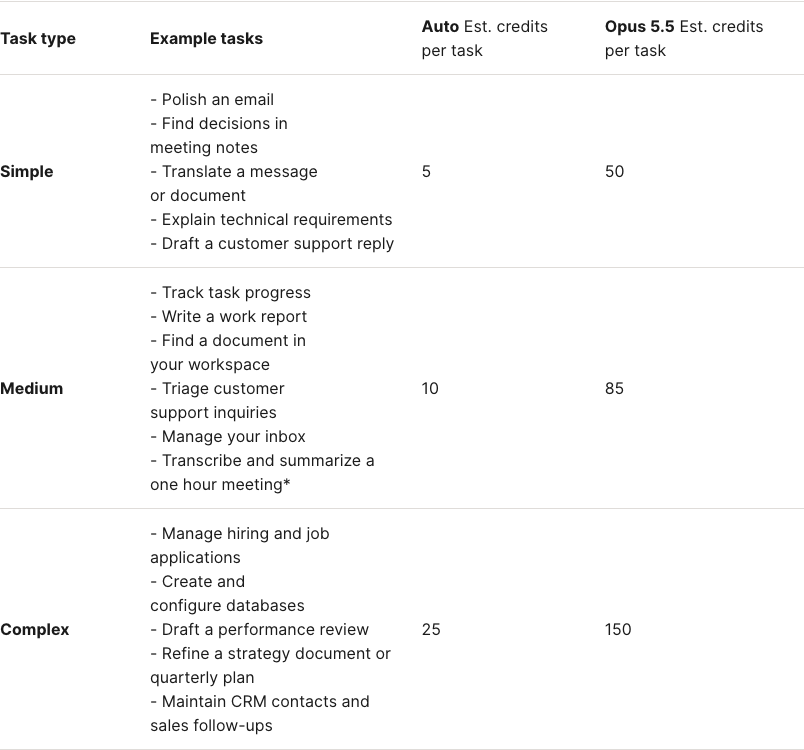
To be fair to Notion, if you let it pick the model, 1,500 credits a month goes a long way: about 60 complex jobs, or 300 simple ones, by its estimates. It’s picking the model yourself that runs out fast. And Notion says the amounts “may vary depending on your plan.”
What it shows is the direction. In May 2025, Notion’s Business plan came with unlimited AI. In August 2026 it got a cap. Today it’s credits, and from December 1 meeting notes start drawing on them too, about 10 credits for a one-hour meeting. We counted what that’s doing to Notion’s reviews in our study of notes app complaints.
Why bring-your-own beats built-in
None of this means AI in your notes is bad. Asking a question of years of notes is useful. We do it ourselves. The question is whose AI does the asking.
You’re probably paying for one already. If you use ChatGPT or Claude, an AI built into your notes app is a second one, and often a second bill. On Notion, full AI comes with Business, which is $10 a month more per person than Plus.
Yours is better, and you pick it. A notes company buys its model from the same few labs and then rations it: credits at Notion, monthly limits at Evernote, a quota and top-ups at Craft, an add-on at Goodnotes. The assistant in your other tab is the full version, and you choose which one.
It only reads when you ask. A connected assistant opens your notes when you send it there, in your AI app, with permissions you set. A built-in one is part of the app, and in some apps it’s on until you find the switch.
The bill stays put. AI is where notes pricing has moved most in the last two years. A notes app that doesn’t sell AI has no AI price to change.
Built-in has real advantages, and we’d be lying to skip them. It needs no setup, and it’s right there in the app. Evernote’s AI Assistant and AI search come on every plan, Free included. If you don’t pay for any AI and want it in your notes anyway, Evernote’s is hard to beat right now.
Bring-your-own isn’t only ours, either. Notion, Evernote and Craft have one-click plugins in ChatGPT. Bear has a Claude connector on the Mac. Joplin and Simplenote have servers that run on your own computer. We compared them all in the best notes apps with an MCP server. The difference is whether the app also puts its own AI inside your notes.
Where Harbor fits
We make Harbor, so read this part knowing that.
Harbor has no AI assistant. No chat, no AI search, no sparkle button. You connect the ChatGPT or Claude you already use, and the steps are in how to connect ChatGPT to your notes and how to build a second brain with Claude.
But “no AI” would be too strong, so here’s exactly what Harbor does with machine learning:
- OCR, automatically. When you add an image or a PDF, Harbor sends it to Google Cloud Vision to read the text, so you can search for it. That’s machine learning, and it’s the reason a scanned receipt turns up in search.
- Transcripts and summaries, when you ask. A recording stays audio until you press Transcribe. A summary is a second button.
- Two optional helpers. Suggest title names a note when you press the button. Guess the notebook files scans from a watched folder, and it’s off until you switch it on for that folder.
Encrypted notes are never sent to any of them, and none of the companies involved may use what they get for their own purposes. The privacy policy names every one of them.
Where it’s behind. Two places.
- Nothing to ask without your own AI. Evernote gives you AI search on its free plan. In Harbor, asking a question of your notes means connecting ChatGPT or Claude, and Harbor isn’t in either one’s directory, so you paste an address.
- If you want no machine learning near your notes at all, Harbor isn’t it. OCR runs on every image and PDF you add, unless the note is encrypted. Notesnook, Standard Notes or Obsidian are closer to what you want. If you’re weighing that trade, we wrote about it in should you encrypt your notes.
Pick the notes app for the notes. Then pick the AI separately, if you want one at all. They don’t have to come from the same company, and lately the bill’s been easier to live with when they don’t.
Sources
Notion: AI credits · Standard, Select and Notion credits · Notion credits · Notion AI FAQs · Complimentary AI responses · Managing AI models · Customize your sidebar · AI security and privacy · “More for less” (October 19, 2026) · Pricing.
Evernote: AI features and how to turn them off · AI Assistant FAQ · Compare plans.
Microsoft: Turn off Copilot in Microsoft 365 apps · Copilot in OneNote · Compare Microsoft 365 plans.
Apple: Apple Intelligence requirements · Turn off or restrict Apple Intelligence · Record and transcribe audio · Image Wand.
Google: Lists with Gemini in Keep · Google AI plans.
Other apps: Craft Assistant and usage · Goodnotes pricing and license-key settings · Notability Learn · Joplin 3.7 and AI chat · Joplin on AI and privacy · Bear 2.8 · Obsidian pricing · Notesnook vs Evernote and pricing · Standard Notes plans · UpNote · Simplenote’s development update.
Last checked: November 2, 2026. We read each company’s own help pages, pricing pages and announcements for this post, and took the Notion screenshot from its public help center. AI settings move around more than anything else in these apps. If something here no longer matches what you see, tell us at hello@harbor.my and we’ll fix it and re-date this line.