Blog ·October 28, 2026 ·Cloudmanic Labs
How to connect ChatGPT to your notes
On October 27, Evernote told its users how to connect ChatGPT: “open Plugins and search for Evernote.”
That’s the whole instruction. A month earlier it took a developer setting and a server address. Now some notes apps install into ChatGPT the way apps install on a phone.
Some. Apple Notes and Google Keep still have no way in, and Obsidian’s depends on software running on your own computer. Here’s how each popular notes app gets into ChatGPT today, what ChatGPT can do once it’s there, and what it’ll cost you.
A word about us first. We make Harbor, a notes app, and it’s in this guide. It isn’t in ChatGPT’s plugin directory, so it takes the longer route. We’ll say so when we get there.
The short version
- One click, from ChatGPT’s plugin directory: Evernote, Notion, Microsoft OneNote and Craft. Open Settings > Plugins, find the app, choose Install plugin, and sign in.
- Add it yourself by URL: any notes app with a hosted MCP server that isn’t in the directory, Harbor included. Your ChatGPT plan decides whether you can, and whether ChatGPT can write.
- Reads the note on your screen, Mac only: Apple Notes, through the older ChatGPT app. It can’t edit.
- No direct connection: Google Keep, UpNote and Notesnook. Export and upload.
- Only on your own computer: Bear, Joplin and Obsidian’s community server. ChatGPT on the web and phone can’t reach them.
Three ways in
Plugins from the directory
ChatGPT renamed its app directory to Plugins in July. A plugin is an app connection, sometimes bundled with instructions for using it well.
To install one, open Settings > Plugins, pick the app, choose Install plugin, then Connect and sign in to the app. Then mention it in a chat. OpenAI says very old versions of the phone apps may still call the section Apps.
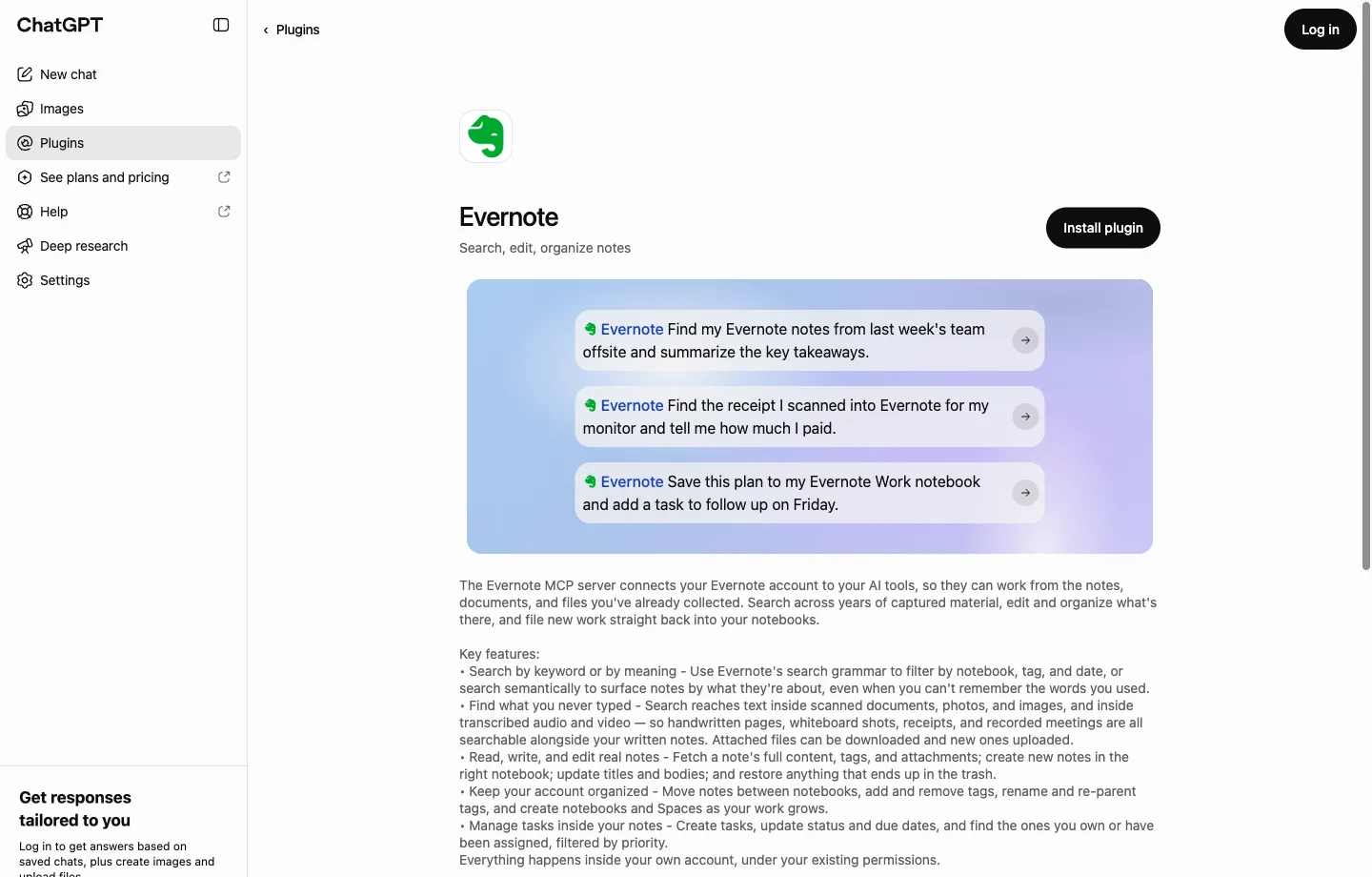
Plugins are available on every ChatGPT plan, Free included, according to OpenAI’s pricing page. Each one can still be limited by your plan, your workspace and your region.
Your own server, by URL
If your notes app runs a hosted MCP server but isn’t in the directory, you can add it yourself. OpenAI’s current steps:
- Go to Plugins.
- Select the + button, then Add custom MCP server.
- Give it a name.
- Under Connection, paste the server’s address.
- Set up authentication. For most notes apps that means OAuth, where you sign in to the app.
- Read the risk warning and tick I understand and want to continue.
- Choose Create as a plugin, then install it and start a new chat. Type @ and pick it.
Until October 1 you had to switch on “developer mode” first. You don’t any more.
The catch is your plan, and OpenAI’s own pages don’t agree about it. The help center says full read-and-write access is for Business, Enterprise and Edu, and that on Business only admins can add a server. It says Pro gets read and fetch only. The pricing page lists the feature for Plus and Pro, and a Plus user on OpenAI’s forum reported on October 19 that it was still rolling out. Free and Go don’t get it on any page. And you can only add a server on the web, not in the phone apps.
The Mac app reading your screen
ChatGPT’s Mac app has a feature called Work with Apps. It can see what’s open in certain apps, including Apple Notes and Notion. OpenAI says it includes the last 200 lines of what’s open, or focuses on the text you’ve selected. It can’t edit notes. Editing is only for code editors.
It belongs to the older Mac app. When OpenAI shipped a new desktop app in July, the old one became ChatGPT Classic. On October 9, a user on OpenAI’s forum reported that the new app doesn’t have Apple Notes support, and OpenAI hasn’t replied. If you rely on this, keep Classic installed.
And there’s always the fallback: export your notes and upload them to a ChatGPT project. Free accounts get 5 files per project, Go and Plus get 25, and Pro and up get 40. It’s a copy, so ChatGPT never sees anything you write after you upload.
App by app
| App | How ChatGPT gets in | Can it change notes? | What you need |
|---|---|---|---|
| Evernote | Plugin directory (Evernote calls it beta) | Yes, including moving to trash | A paid Evernote plan, from $99/yr |
| Notion | Plugin directory | Creates and updates pages; no delete | Any Notion plan, but not as a guest |
| Microsoft OneNote | Plugin directory, built by OpenAI (beta) | Creates and updates notes | Notebooks your Microsoft account owns |
| Craft | Plugin directory | Yes, to trash; can be made read-only | A Craft account |
| Apple Notes | Older Mac app reads the open note | No | A Mac and ChatGPT Classic |
| Google Keep | None | No | Copy notes to Google Docs first |
| Obsidian | No official route; Miyo, a third-party plugin | Through Miyo, yes | Miyo, $4.99/mo after a trial |
| Bear, Joplin | Servers on your own computer only | Not from ChatGPT on the web | — |
| UpNote, Notesnook | None | No | Export and upload |
| Harbor | Custom server, by URL | Depends on your ChatGPT plan; no delete | Harbor, and a ChatGPT plan that allows custom servers |
Evernote
Evernote’s plugin went live in the directory around October 20 and was announced on the 27th. Its server has 28 tools. It searches by keyword or by meaning, reads and edits notes, files them into notebooks, manages tags and tasks, and moves notes to the trash. Its listing says search reaches text inside scanned documents, photos and transcribed audio. That’s a real advantage. Your receipts and whiteboard shots are findable from a chat.
It’s on paid plans only. Evernote’s blog says the connection is “available on all paid Evernote plans,” and its compare-plans page shows it missing from Free. The cheapest way in is Starter at $99 a year, which caps you at 1,000 notes. Evernote’s developer site still labels the server beta and says it’s “rolling out gradually.”
If you’re weighing whether Evernote is still worth that money, we went through it in is Evernote worth it in 2026?
Notion
Notion is in the directory, and it’s the most established connection on this list. ChatGPT can search and read your workspace and, OpenAI says, may be able to create or update pages, depending on your plan and settings. Notion’s server has no delete tool. It works on every Notion plan, but guests in someone else’s workspace can’t connect.
Don’t confuse it with “Use your ChatGPT plan with Notion Agent,” which goes the other way. That brings ChatGPT into Notion. It doesn’t bring your notes into ChatGPT.
Microsoft OneNote
This one surprised us. OneNote has had a plugin since September 3. OpenAI built it, not Microsoft, and it’s labeled beta. It can find and summarize notes and create or update them. For personal accounts, OpenAI says it only works on notebooks owned by the Microsoft account you connect, so notebooks someone shared with you are out.
Microsoft’s own MCP servers still don’t cover OneNote, and ChatGPT’s SharePoint and OneDrive plugin doesn’t read OneNote files. The OneNote plugin is the way.
Craft
Craft is a one-click install now, too. It’s still the one we’d point a nervous person to, because it goes furthest on limits: a connection can be made read-only, or restricted to chosen documents. We compared it with the rest in the best notes apps with an MCP server.
Apple Notes
There’s no Apple Notes plugin, and Apple hasn’t shipped an MCP server for Notes. When ChatGPT added iCloud Mail and Calendar plugins on October 27, Notes wasn’t part of it.
Your options:
- ChatGPT Classic on a Mac reads the note that’s open, as described above. One note at a time, read-only.
- Apple Intelligence’s ChatGPT extension works inside Writing Tools and Siri. It sends the text you choose, not your library.
- Export and upload. Since macOS 26, Notes exports to Markdown, a folder at a time. Here’s how to export all your Apple Notes, then upload the files to a ChatGPT project.
Community-built MCP servers for Apple Notes exist, but they run on your Mac, so ChatGPT on the web can’t use them.
Google Keep
No plugin, and Google’s official MCP servers cover Gmail, Drive and Docs but not Keep. ChatGPT’s Google Drive plugin reads Docs, Sheets and Slides.
So there’s a workaround. Keep has a Copy to Google Docs option on each note. Copy the notes you care about, and the Drive plugin should be able to read them. We haven’t tested that end to end. For everything at once, Google Takeout exports your whole Keep.
Obsidian
Obsidian has no official MCP server. The popular community plugin, Local REST API, has included one since May, but it runs on your computer. ChatGPT on the web and phone can’t reach it.
The way in we found is Miyo, from Brevilabs, the people behind the Obsidian Copilot plugin. It’s in ChatGPT’s directory and relays ChatGPT to local Markdown folders, an Obsidian vault included, with search and edit. Remote access needs a paid plan after a 7-day trial, $4.99 a month. We haven’t tried it.
Bear and Joplin
Both ship official MCP servers, and both run on your own computer. Bear’s has been there since version 2.8, and its docs name Claude, Claude Code and Cursor, not ChatGPT. Joplin’s arrived in September, starts switched off, and is labeled beta.
The new ChatGPT desktop app does have a setting for servers on your computer. OpenAI documents it for Codex, its coding agent, and there’s an open bug report that those tools don’t reach ordinary chats. We haven’t tested it. For now, plan on Claude if you want an AI working in Bear or Joplin.
UpNote and Notesnook
Neither has an MCP server. UpNote has no API to read notes through. Notesnook’s maintainers turned down a contributed MCP server in April and said a command-line tool is coming instead. It hadn’t shipped as of version 3.4.11, released October 26.
Both export to Markdown, HTML and PDF. Export and upload.
Before you click Allow
Connecting is the easy part. Decide what ChatGPT is allowed to do before it does it.
Start on “Always ask.” Each plugin has four settings: Always ask, Allow read actions, Allow low-risk actions and Allow all actions. ChatGPT asks before any write by default. OpenAI’s own words on the last one: it “carries elevated risk.” Leave it on Always ask for a week, see what it actually wants to do, then loosen it.
Reading is most of the value. The thing that changes your day is ChatGPT finding the note you forgot you wrote. Letting it write is useful. It’s also how a vague request turns into a rewritten note.
Only connect servers you trust. OpenAI warns that an untrusted server can “trick ChatGPT into using tools in unintended ways, including changing or deleting data.” Stick to the notes company’s own server or plugin.
What ChatGPT reads goes to OpenAI. That’s true for every route on this page. Your notes app’s privacy policy stops at the connection, and OpenAI’s applies after. If some notes should never leave, keep them out. We wrote about the trade-offs in should you encrypt your notes?
Where Harbor fits
We make Harbor, so read this part knowing that.
Harbor has no AI built in, on purpose. You bring the AI you already pay for, and ChatGPT is one of them. But Harbor isn’t in ChatGPT’s plugin directory, so you add it yourself, using the steps above, with this address:
https://app.harbor.my/mcp
You sign in to Harbor and approve the connection. The full setup is here.
Where it’s good. ChatGPT can search and read your notes, create and append to them, file them into notebooks, tag them, and manage tasks. There’s no delete tool, so it can’t throw a note away. Every change it makes is labeled, so you can tell its edits from yours. Encrypted notes stay out of reach entirely. ChatGPT gets a marker saying the note is locked, never its contents.
Where it’s behind. Two places, and both matter.
- It takes the longer route. No install button, and your ChatGPT plan decides the rest. On Business, Enterprise and Edu it reads and writes. On Pro, per OpenAI, it reads only. On Plus, OpenAI’s pages disagree. Free and Go can’t add it at all.
- Its search doesn’t reach inside attachments. Harbor’s app reads the text in your scans and PDFs, but search through the AI connection covers titles, text and tags. ChatGPT can still open an attachment and read it. It won’t find a receipt by what’s printed on it the way Evernote’s will.
If ChatGPT is the AI you use most, that first point is the one to weigh. If you use Claude, Harbor works there too, on the web, desktop and phone, and the comparison is here.
Sources
OpenAI: Plugins in ChatGPT · Connected apps in ChatGPT · Connecting custom MCP servers in ChatGPT · Work with Apps on macOS · Release notes · Projects in ChatGPT · OneNote in ChatGPT · Notion in ChatGPT · Google Drive in ChatGPT · SharePoint and OneDrive in ChatGPT · Building a custom MCP server · ChatGPT pricing · Developer mode no longer required (October 1, 2026) · Plus rollout report (October 19, 2026) · Apple Notes missing from the new Mac app (October 9, 2026) · Codex local MCP bug.
Notes apps: Evernote’s October 27 announcement · Evernote’s ChatGPT and Claude use cases · Evernote MCP and its tools · Evernote compare plans · Notion MCP tools and setup · Microsoft MCP servers · Craft MCP · Google Workspace MCP servers · Miyo · Bear’s MCP server · Joplin’s MCP server · UpNote’s URL scheme · Notesnook’s decision.
Plugin listings for Evernote, Notion, OneNote, Craft and Miyo read from ChatGPT’s plugin directory, signed out, on October 28, 2026.
Last checked: October 28, 2026. We read every vendor’s own documentation and ChatGPT’s plugin directory for this post, but we didn’t connect each app to a ChatGPT account, and OpenAI changes this often. Where OpenAI’s pages disagree with each other, we’ve said so. If something here no longer matches what you see, tell us at hello@harbor.my and we’ll fix it and re-date this line.