Start here
Authentication
Two ways in: a personal access token for your own scripts, or an OAuth app for integrations other people install. Both are scoped to exactly what you allow.
Every API request is authenticated with a bearer token in the
Authorization header:
curl https://app.harbor.my/api/v1/notes \
  -H "Authorization: Bearer $HARBOR_TOKEN"
There are two kinds of token, for two different jobs.
Personal access tokens
A personal access token (PAT) is a long-lived key that acts as you. Use one
for your own scripts, a cron job, a CLI, or a one-off integration. Tokens start
with hbp_ and are scoped to exactly the permissions you pick.
Create a token
- Sign in to Harbor and open Settings → Developer.
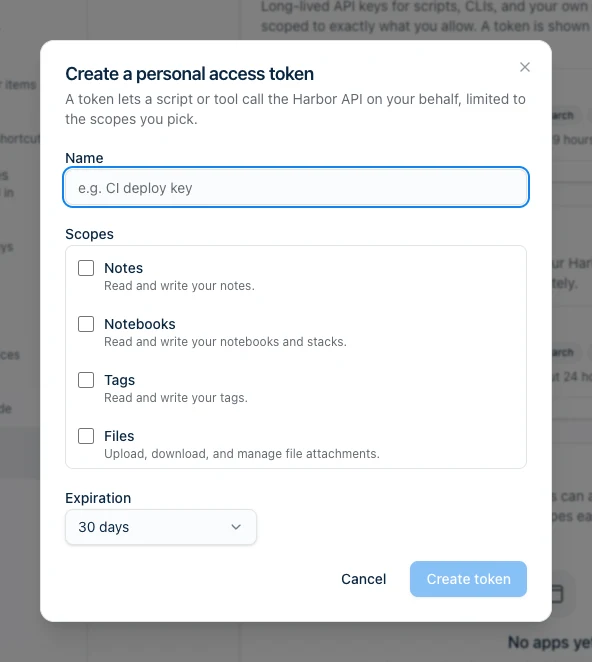
- Under Personal access tokens, click Create token.
- Name it (e.g. “CI deploy key”), choose an expiration, and select the scopes it needs.
- Click Create token and copy the value. It’s shown only once — store it in a secret manager or an environment variable, never in your code.
Use a token
Pass it as a bearer token on every request:
export HARBOR_TOKEN="hbp_your_token_here"

curl https://app.harbor.my/api/v1/notes \
  -H "Authorization: Bearer $HARBOR_TOKEN"
Revoke a token
Open Settings → Developer, find the token, and use its ⋯ menu to delete it. The token stops working immediately. Do this the moment a token might have leaked — then create a fresh one.
OAuth apps
An OAuth app lets other Harbor users authorize your integration to act on their behalf, limited to the scopes each user approves — the same pattern as “Sign in with…” buttons elsewhere. Build one when you’re shipping a product that connects to Harbor, not just scripting your own account.
Register an app
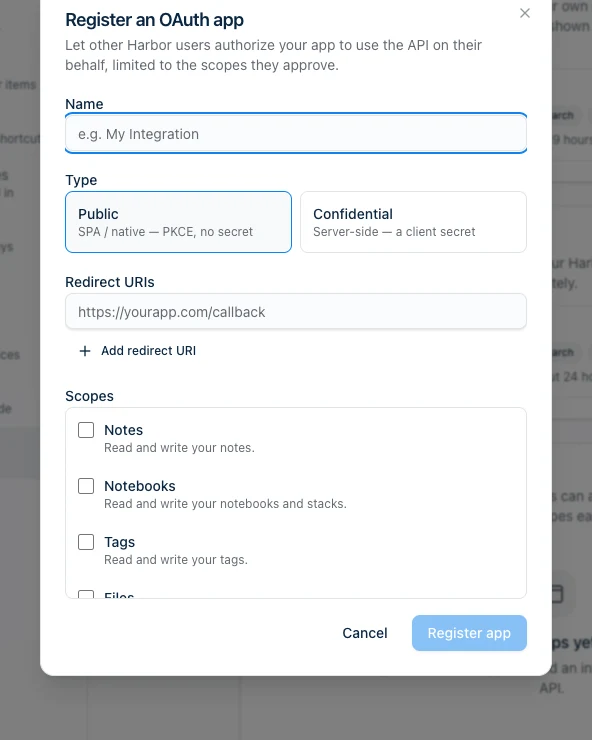
In Settings → Developer → OAuth apps, click Register app:
- Name — what users see on the consent screen.
- Type — Public (a single-page or native app that can’t keep a secret, using PKCE) or Confidential (a server-side app that holds a client secret).
- Redirect URIs — where Harbor sends users back after they approve. Add one or more; the redirect on each request must match exactly.
- Scopes — the maximum permissions your app can request.
The authorization code flow
Harbor implements standard OAuth 2.0 Authorization Code, with PKCE for public clients. The shape of the flow:
Start the authorization request with your
client_id, aredirect_urithat exactly matches one you registered, thescopeyou want, a randomstate, and a PKCEcode_challenge(S256 — PKCE is required):GET https://app.harbor.my/api/v1/oauth/authorize ?response_type=code &client_id=YOUR_CLIENT_ID &redirect_uri=https://yourapp.com/callback &scope=notes+notebooks &state=RANDOM_STATE &code_challenge=BASE64URL_SHA256_OF_VERIFIER &code_challenge_method=S256The user approves the requested scopes on Harbor’s hosted consent screen.
Harbor redirects back to your
redirect_uriwith a short-lived, single-usecode(and yourstate, which you must verify).Exchange the code for tokens (confidential clients send the client secret; public clients send the PKCE
code_verifier):curl -X POST https://app.harbor.my/api/v1/oauth/token \ -H "Content-Type: application/json" \ -d '{ "grant_type": "authorization_code", "code": "ac_the_code", "redirect_uri": "https://yourapp.com/callback", "client_id": "YOUR_CLIENT_ID", "code_verifier": "THE_PKCE_VERIFIER" }'You get back an
at_access token (1-hour lifetime) and anrt_refresh token, which your app then uses exactly like a personal access token. Refresh tokens are single-use and rotate on every refresh.
Full request/response detail for every OAuth endpoint — authorize, token (all grant types), revoke, plus registering and managing apps and grants — is in the OAuth & tokens reference. The Harbor CLI is open source and implements this exact public-client PKCE handshake if you want a reference.
Scopes
Both token types are limited to scopes. Request the fewest you need — users trust apps that ask for less, and a leaked token can only do what its scopes allow.
| Scope | Grants |
|---|---|
notes | Read and write notes, including their tags and links. |
notebooks | Read and write notebooks and stacks. |
tags | Read and write tags. |
files | Upload, download, and manage file attachments. |
search | Run searches, including OCR-inside-files. |
sync | Use the raw sync engine (change cursors) — for building clients. |
profile | Read basic profile information. |
A request that touches a resource outside its token’s scopes is rejected with
403 Forbidden. See Errors for the full error shape.
Keeping tokens safe
- Never commit tokens or put them in client-side code you ship. Use environment variables or a secret manager.
- Scope down. A token that only needs to read notes shouldn’t have
files. - Rotate and expire. Prefer an expiration for CI tokens; rotate on a schedule and whenever someone leaves.
- One token per integration, so you can revoke one without breaking the rest.
Next steps
- Conventions — pagination, timestamps, the response envelope
- Errors — status codes and error bodies
- API reference — every endpoint