Blog ·September 3, 2026 ·Spicer Matthews
We handed the books to an agent

Bookkeeping used to cost me a Saturday a month.
Not the hard part. An accountant does the hard part. The Saturday went on the stupid part: opening every receipt email one at a time, working out whether I’d already booked it, typing it into the ledger, screenshotting the email so there’d be proof, and then doing the whole thing again four weeks later having forgotten exactly where I’d stopped.
That job is gone. It runs on a schedule now, takes about forty seconds, and posts what it did to Slack. Most days it finds nothing and says so.
What actually runs
An agent, given a list of places money shows up.
It searches the inbox for receipts from each vendor it knows about. It pulls deposits from the bank. It checks every hit against what’s already in the ledger so it never books the same charge twice. It attaches the vendor’s own invoice PDF where there is one, and a rendered screenshot of the email where there isn’t. It books each entry. Then it recomputes the month’s profit and loss from the raw ledger and writes it into Harbor as a note.
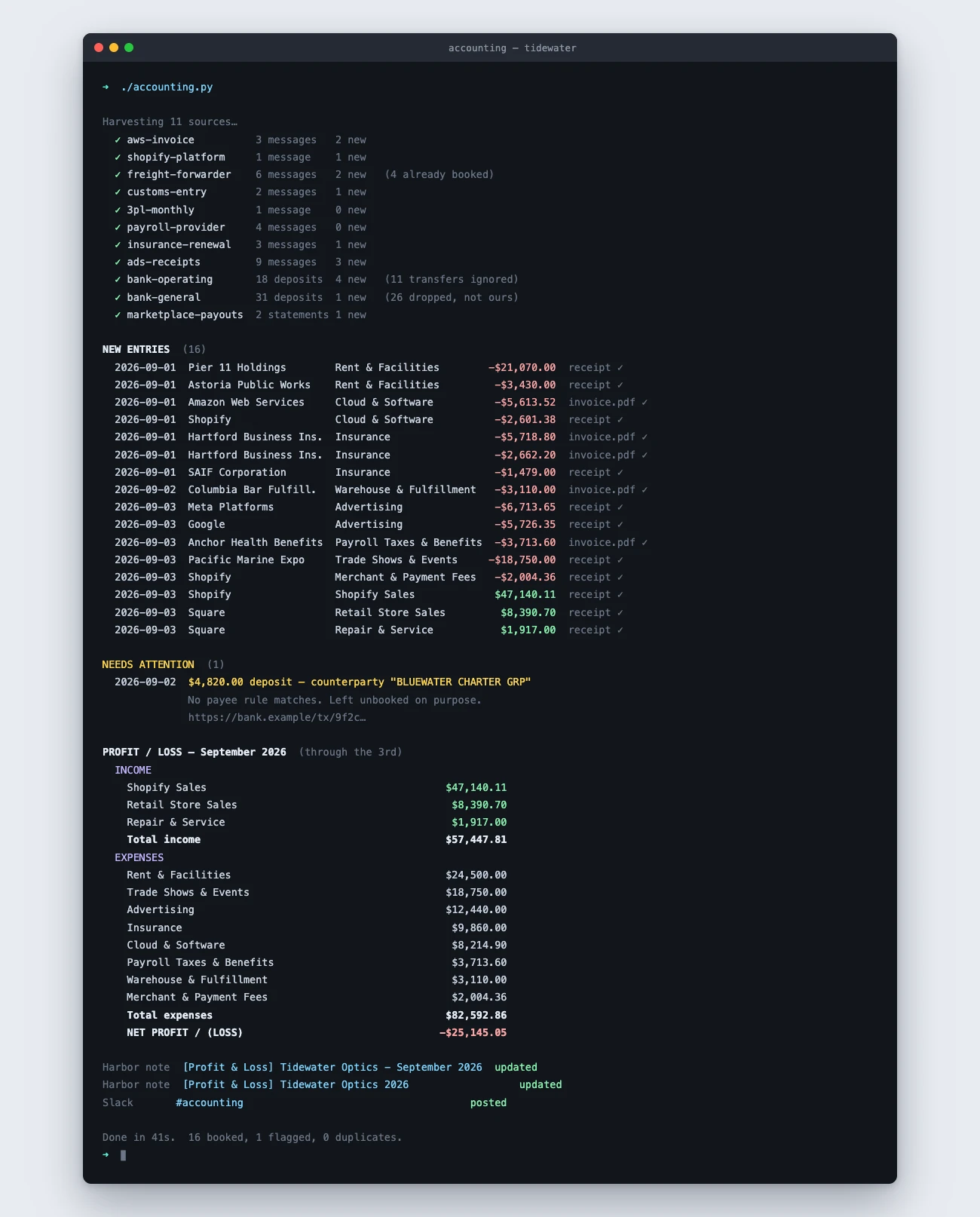
None of that is a Harbor feature. It’s a script an agent wrote and now runs — about 1,800 lines of Python across three files. The interesting question isn’t how it works. It’s where the answer goes when it’s done.
The report is a note
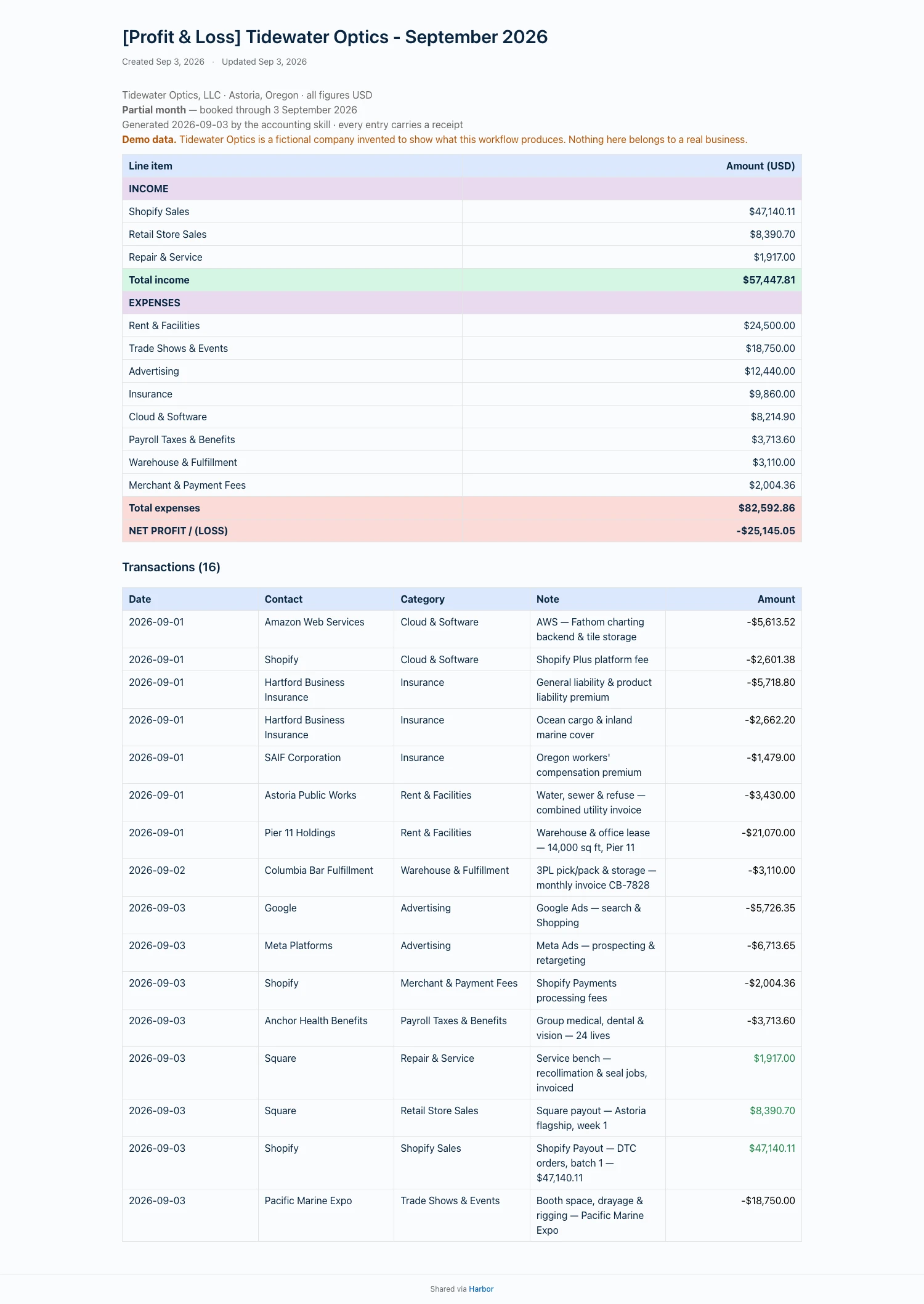
Here’s what lands in my library at the end of a run.
And a second note that keeps the whole year in one grid.
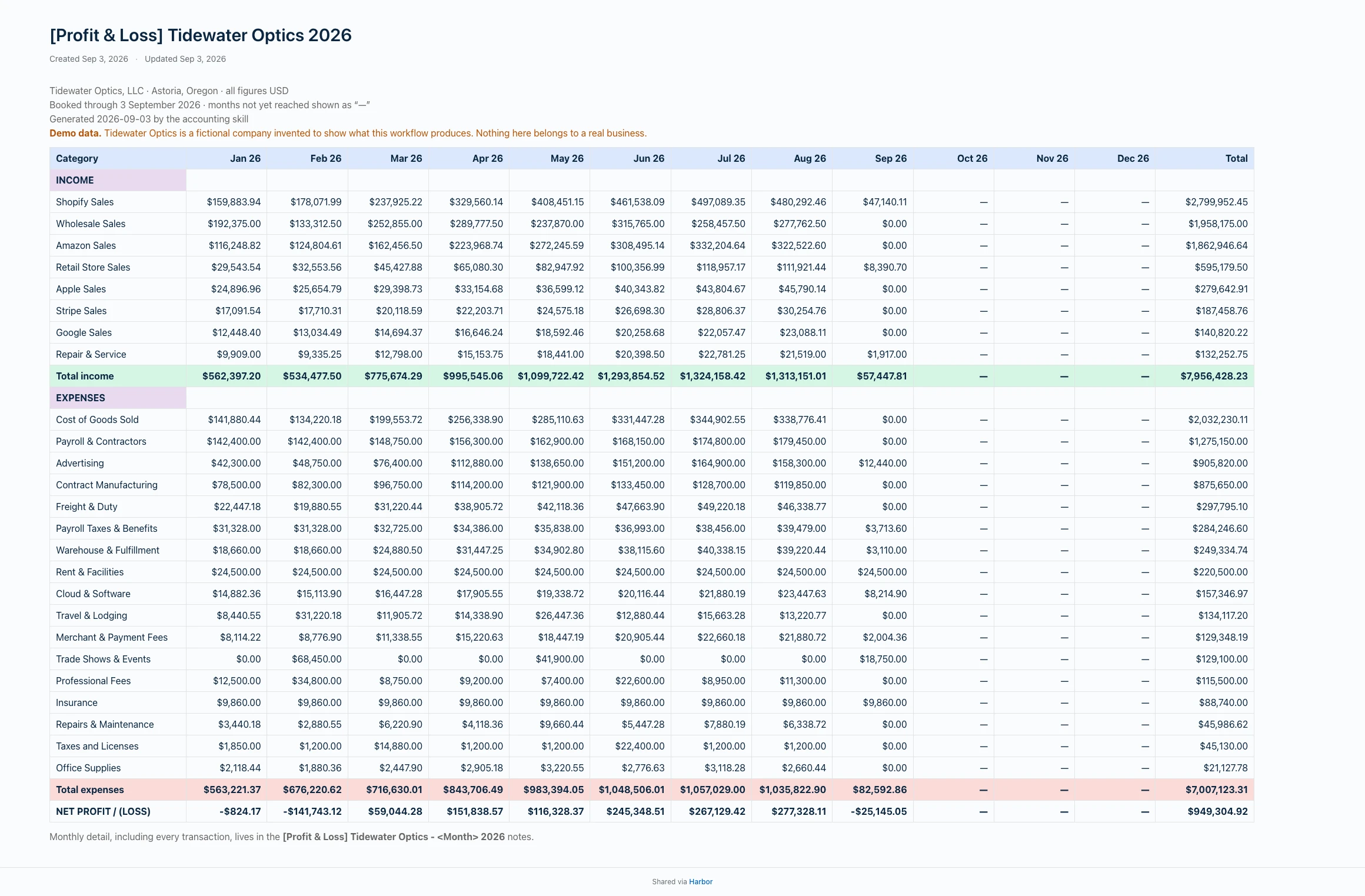
Both notes are keyed on their title, so the run updates them in place rather than piling up a new note every night. And if I’ve restyled a table — dragged a column wider, painted a row a colour I like — the run puts my formatting back on top of the new numbers. It only writes at all when something actually changed.
Why a note and not a spreadsheet
Two ways people normally handle this. Both have the same flaw.
You can keep it in a spreadsheet. Then it’s a file. It lives in a folder, it’s called PL_2026_v4_FINAL.xlsx, and you have to remember it exists.
Or you can lean on your accounting system’s own reports. Better, until you want the number somewhere else — in a plan, in a conversation, in front of a lender — and discover it only exists behind that login, in that format, on that screen.
A note is neither. It’s filing. The statement sits in the same library as the lease, the supplier contracts, the insurance policy and the note where I worked out our pricing. Searchable next to all of it. Open on my phone. Still there in ten years.
Let me be plain about the limit, because it matters: Harbor is not a spreadsheet, and we’re not going to pretend otherwise. There’s no formula bar. Nothing recalculates. Typing a sixty-five-row transaction table into a note by hand would be genuinely miserable and I’d never do it twice.
But nobody’s typing it. That’s the whole unlock. The moment an agent is doing the entry, the tradeoff flips completely — you get the presentation of a nicely-built document with none of the labour that normally makes it not worth building. Harbor is a bad place to calculate a P&L. It’s a very good place to keep one.
The boring rules are the actual product
The AI part of this took an afternoon. The rest took days, and it’s the reason I trust the output.
Re-runs have to be free. Every entry the script writes carries a marker holding the id of the email or bank transaction it came from. Before booking anything, it reads the ledger back and skips whatever it’s already done. Run it twice by accident and nothing moves. Without that one rule, none of the rest is safe to automate.
It’s never allowed to guess at income. A deposit that matches no rule doesn’t get filed under “probably sales.” It’s left unbooked and printed under a loud banner with a link to it, and it stays that way until a human says what it is. You can see one in the terminal shot above. A confident wrong number is worse than a missing one, and it’s much harder to notice.
Bills aren’t receipts. One vendor sends a payment-due notice carrying the same amount, the same invoice number and the same hostname as the receipt that follows it. Match sloppily and you double-count every charge for a year. One phrase in the body separates them.
Subject lines lie. Another vendor sent the same receipt under two different subjects without mentioning it. Matching on the subject alone quietly lost a third of those charges. So the rules key off the body.
Every entry carries its proof. Where the vendor sends a real invoice PDF, that gets attached. Where it doesn’t, the email itself is rendered to an image with a header banner and attached instead. The point of bookkeeping isn’t the number. It’s being able to show where the number came from.
None of that is clever. It’s the difference between a demo and something you’d let near your books.
Then the notes start working for you
Here’s the part I didn’t expect.
Once the statement is a note, it’s reachable by the same agent that wrote it. Harbor ships an MCP server, a REST API and a CLI, all treated as the product rather than the plumbing. So the next question doesn’t need me to go find a file.
Ask what advertising has cost this year and whether it moved anything. Ask what months lose money and why. Ask for a summary for the accountant. The agent reads the statements, reads whatever else is in the library that bears on it, and answers — because for once everything it needs is in the same place, in a format it can actually read.
That’s the argument for a second brain that isn’t a walled app. Not that AI can write your notes. That it can read them back, alongside everything else you know, and do something with the lot.
Go and look at the real thing
Everything above is our own workflow on our own books. Our numbers are ours, so the examples here are a company that doesn’t exist — Tidewater Optics, an invented marine optics maker in Astoria, Oregon, with invented suppliers and invented revenue. The shape is exactly what the real thing produces. The money is made up.
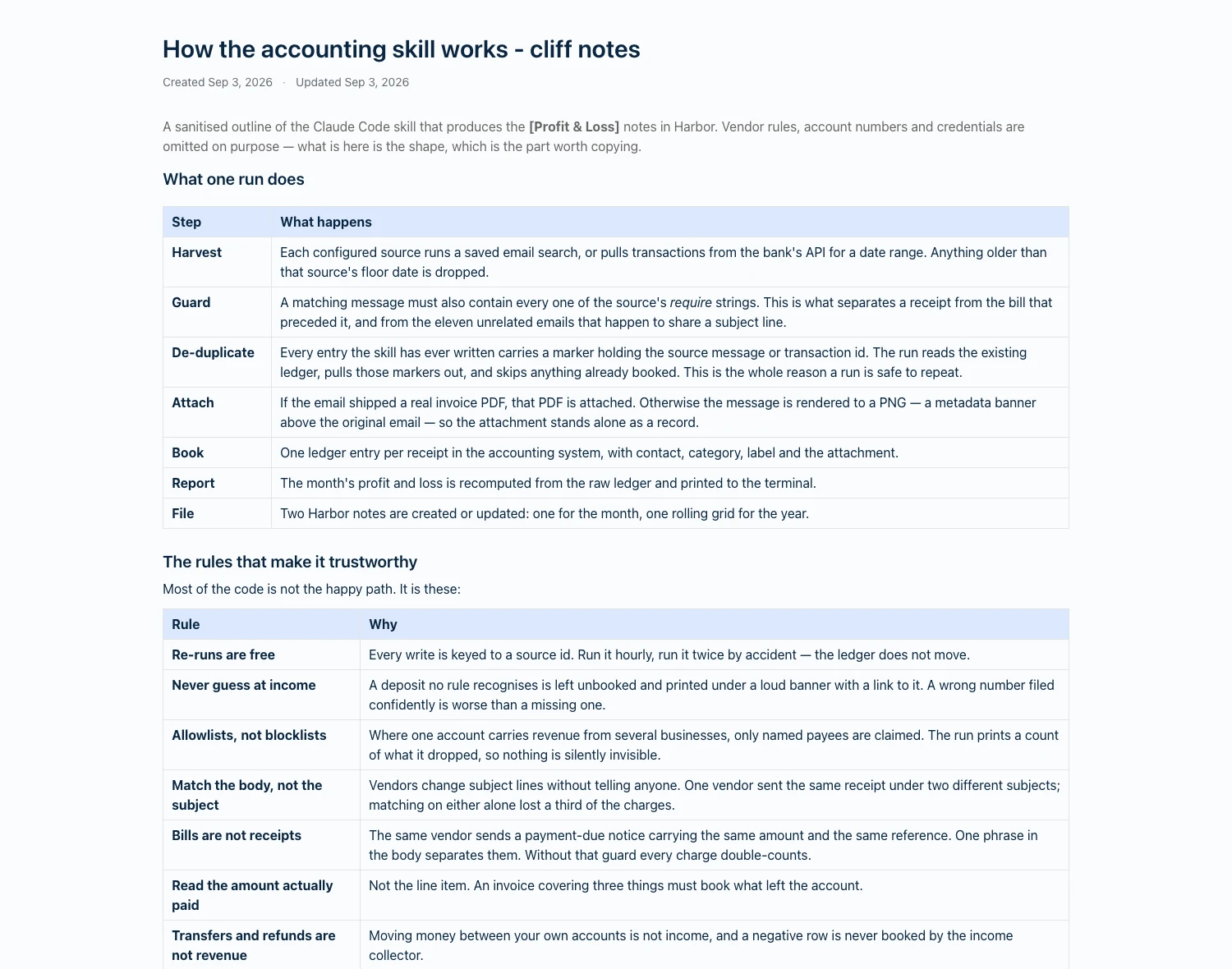
The write-up of how the thing works is a note too, which tells you something about how far this goes.
The notes are published as public read-only pages, which is a normal Harbor feature — any unencrypted note can be shared at a link and unshared again whenever you like. No login needed:
- Profit and loss — September 2026 — three days into the month, so it’s mostly fixed costs and not much else. This is what a live statement looks like.
- Profit and loss — August 2026 — a full month, with all sixty-five transactions behind the summary.
- Profit and loss — July 2026
- Profit and loss — the year — the category-by-month grid.
- How the skill works — cliff notes on the pipeline and every guardrail, with our vendor rules and account numbers stripped out.
One boundary worth naming, since this is financial data: encrypted notes can never be shared, exported or read through the API, the CLI or MCP. We can’t read them, so nothing you connect can either. That’s a real tradeoff — encrypt what’s sensitive and your agent can’t help with it. Both halves of that are true and you get to pick.
The thing I keep coming back to
We didn’t build any of this. There’s no bookkeeping feature in Harbor and there isn’t going to be one.
We just left the doors open — a real CLI, a real API, a real MCP server, and a note format rich enough to hold a table you’d actually show someone. Then an agent walked through and did a job I’d been doing badly by hand for years.
The Saturday is what I got back. But the part that keeps paying is that the answer landed somewhere it can be found again.
Want to try it: start free, install the Harbor CLI, and run harbor skill install. More on the approach in bring your own AI.
Frequently asked questions
Can AI do my bookkeeping?
Is Harbor an accounting tool?
Why file a report in a notes app instead of a spreadsheet?
How do I connect an AI agent to my Harbor notes?
harbor skill install to teach Claude Code, Codex or Cursor how to read and write your notes properly. Everything runs on personal access tokens you create and revoke yourself.